Loading
Manage Your Billing Processes with Salesforce Billing
Table of Contents
Select Filters

          No results
          No results
          Here are some search tips

          Check the spelling of your keywords.
          Use more general search terms.
          Select fewer filters to broaden your search.

          Search all of Salesforce Help
          Revenue Agreements

          Revenue Agreements

          Revenue agreements are objects with a Revenue Schedule related list. They’re useful for grouping revenue schedules related to the same transaction, so that you can quickly evaluate revenue amounts for that transaction. You can use default or custom functionality to assign revenue schedules to a revenue agreement. Each revenue agreement contains several revenue amount fields that you can customize to report on revenue from the related revenue schedules based on your organization’s revenue reporting standards. (Salesforce Billing Managed Package)
          Required Editions

          Available in: Salesforce Billing Summer ‘18 and later

          The revenue recognition treatment has a Revenue Agreement Association field, which controls when Salesforce Billing makes revenue agreements and when it assigns revenue schedules to them.

          Not Applicable

          Salesforce Billing doesn’t create revenue agreements.

          Manual
          Salesforce Billing doesn’t create revenue agreements. Users must create and assign them on their own. While this value functions the same as Not Applicable, we recommend using it to indicate situations where users should create revenue agreements and custom automation on their own.
          New

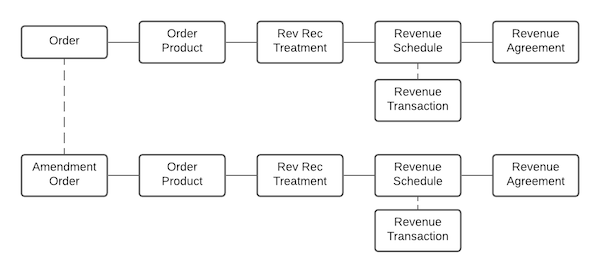
          Salesforce Billing creates one revenue agreement for an order upon revenue schedule creation for that order. If the order has any amendment orders, Salesforce Billing creates and assigns them to a new revenue agreement upon revenue schedule creation.

          A sample flowchart for a New-type revenue agreement association. The order and related amendment order have separate revenue agreements for their revenue schedules.
          Revised Order Product
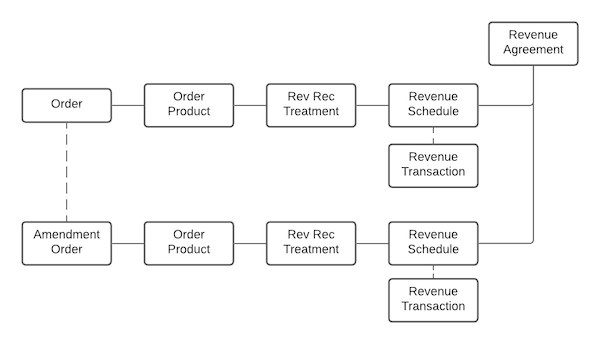
          Salesforce Billing creates one revenue agreement for an order upon revenue schedule creation for that order. The order's related amendment orders are related to the same revenue agreement.
          A sample flowchart showing an order and amendment order. The revenue schedules for each flow up to the same revenue agreement.

          Revenue Agreement Fields

          Revenue agreements contain 8 revenue amount fields. Different organizations have different ways to calculate revenue, so we’ve left the fields without any default formulas or calculations. You can customize them to calculate revenue based on your organization’s standards. Since most revenue agreement will be related to one or more revenue schedules, you can quickly reference their fields in your revenue amount calculations.

          Revenue Bookings Fields Revenue Billings Fields
          Total Transaction Amt(Bookings) Total Transaction Amt(Billings)
          Total Revenue Allocation Amt(Bookings) Total Revenue Allocation Amt(Billings)
          Total Revenue Liability Amt(Bookings) Total Revenue Liability Amt(Billings)
          Total Revenue Expected Amt(Bookings) Total Revenue Expected Amt(Billings)

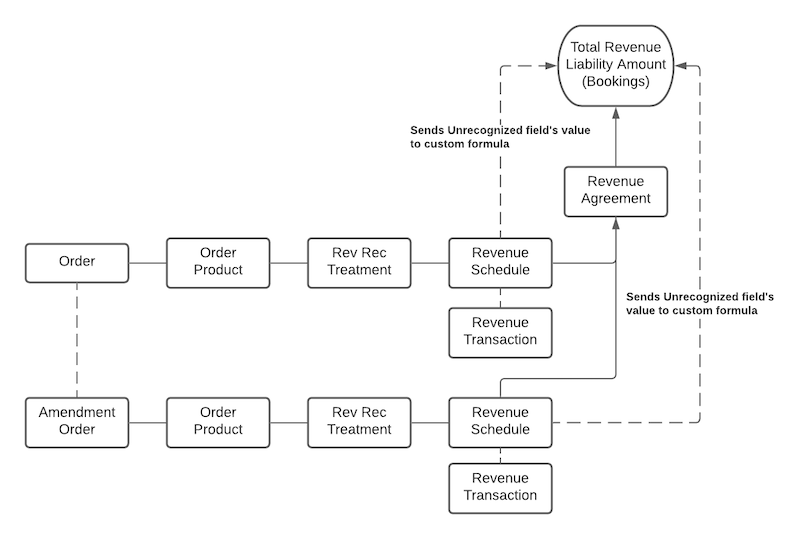
          For example, let’s say you have a Revised Order Product revenue agreement association. You could configure the Total Revenue Liability Amount (Bookings) field with a formula to use the Unrecognized field value from each revenue schedule related to your revenue agreement.

          A sample flowchart showing that the Total Revenue Liability Amount (Bookings) field draws field data from both revenue schedules related to the revenue agreement.

          You can also use custom automation to populate the revenue agreement’s Order, Contract, and Order Product fields, which may be helpful for your revenue reporting.

          Example
          Example

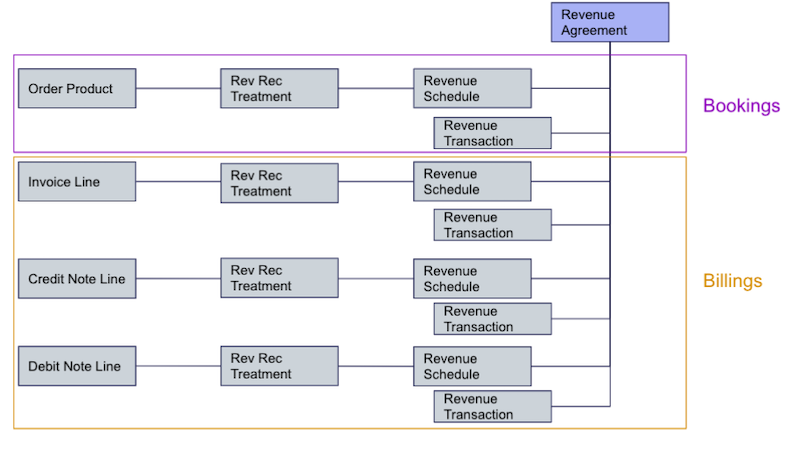
          Let’s say you want customized revenue agreement reporting that assigns the revenue schedules for an order product’s related invoice lines, credit note lines, and debit note lines to a revenue agreement. Since invoice lines, credit note lines, and debit note lines are typically recognized as billings, this configuration would help you quickly evaluate the bookings and billings for a given transaction.

          A custom revenue agreement workflow where the order product and its invoice lines, credit note lines, and debit note lines all roll up to the same revenue agreement.
          1. Create a revenue recognition rule and treatment where the treatment’s Revenue Agreement Association as a value of Manual.
          2. Write custom automation for the Manual value.
            1. Salesforce Billing creates a revenue agreement upon revenue schedule creation for a given order product.
            2. Salesforce Billing creates revenue schedules for each invoice line, credit note line, and debit note line for the order product, then assigns those revenue schedules to the revenue agreement.
           
          Loading
          Salesforce Help | Article