
Loading
Feature Disruption - Service Cloud VoiceRead More
Feature degradation | Gmail Email delivery failureRead More
Manage Your Billing Processes with Salesforce Billing
Table of Contents
Select Filters

          No results
          No results
          Here are some search tips

          Check the spelling of your keywords.
          Use more general search terms.
          Select fewer filters to broaden your search.

          Search all of Salesforce Help
          Allow Customers to Save Credit Card Details

          Allow Customers to Save Credit Card Details

          Allow customers to view several options for saving credit card details when they reach the end of your force.com checkout page. They can save their credit card information as a token and use it for fast payments in the Payment Center. They can also enable automatic payments so that Salesforce Billing uses the token to charge their credit card upon invoice due dates. (Salesforce Billing Managed Package)
          Required Editions

          Available in: Salesforce Billing Winter ’19 and later

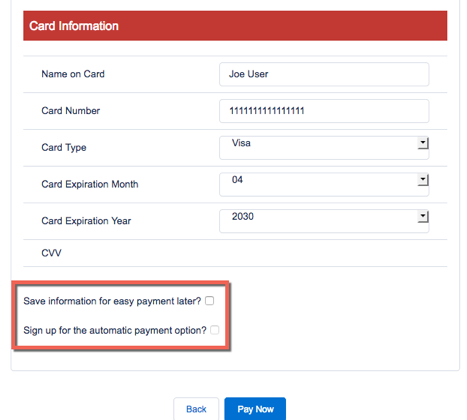
          After you enable credit card saving, Salesforce Billing shows two settings at the end of the Enter Credit Card Details page in your org’s checkout page. Customers can select these settings as needed.

          Save information for easy payment later?
          Salesforce Billing saves as a token the credit card data that the customer entered on the force.com page. The token generates after the customer clicks Pay Now.
          Customers can use that credit card to pay balances in the payment center without re-entering credit card details.
          Sign up for the automatic payment option?
          Customers can select this option only if they also selected Save information for easy payment later?
          Whenever the customer’s invoice reaches its due date, Salesforce Billing automatically uses their credit card to pay the invoice balance.
          1. From Setup, in the Quick Find box, enter Installed Packages, and then select Installed Packages.
          2. Find the Salesforce Billing package and click Configure.
          3. Click the Payment tab.
          4. Select Save credit card details.
            Salesforce Billing adds credit card detail options to the Enter Credit Card Details page.

            The credit card detail settings as they appear on the Enter Credit Card Details page.

           
          Loading
          Salesforce Help | Article