
You are here:
Guidelines for Bundle Renewals
Guidelines for replacing product options on renewal and reevaluating bundle logic. (Salesforce CPQ Managed Package)
Required Editions
| Available in: All CPQ Editions |
- Replacement of Product Options on Renewal
- To replace a product option on renewal, define a replacement for both the product option record and the product that it references through its optional SKU. The product option field Renewal Product Option looks up to your replacement product option. The product’s Renewal Product field looks up to the replacement product. For example, let’s say your company sells a bundle with various SaaS licenses. When a customer renews the bundle, you want Salesforce CPQ to replace your SPM Basic Package product option with a product option for your SPM Advanced Package. The diagram shows how you can set this up.
-
 Important Always use the renewal product option when renewing a product that’s part of a bundle. Otherwise, Salesforce CPQ changes only the product on renewal, which can cause errors when you reconfigure your renewed bundle.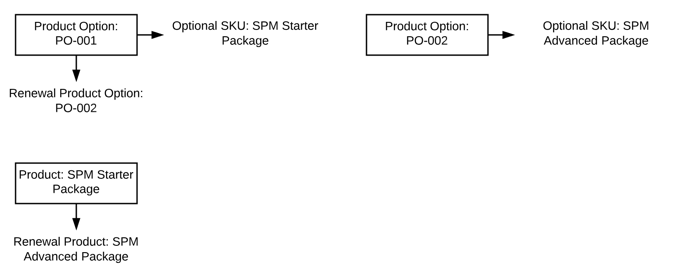
- Reevaluate Bundle Logic on Renewals Setting (Available Only in Legacy Amend and Renew Service)
- Select the Subscriptions and Renewals package setting Reevaluate Bundle Logic on Renewal to automatically reconfigure a bundle on renewal. Renewing a bundle while this setting is active runs all configuration rules and automatically adds all required products. This setting provides the same features as a user manually finding the renewal quote, reconfiguring the bundle, and then saving it.
- The setting Reevaluate Bundle Logic on Renewal is deselected by default. You can leave it deselected when you renew a quote whose renewal bundle configuration has changed, because the new bundle has different configuration logic. When the setting is selected, new options to are added to the bundle automatically, which prevents you from manually reconfiguring the bundle as needed.
- If you switch to the Large-Scale Amendment and Renewal service, you must manually readd bundles on your renewal quotes or use customizations to reevaluate bundles.

Note Salesforce CPQ doesn’t support the reparenting of a child asset in a bundle to a different
parent on renewal. Also, Salesforce CPQ doesn’t support renewing or replacing child products with
parent products in a bundle. For example, here’s a renewal of a child option to parent
bundle.
Original bundle:
- Parent A
- Child B
- Child C
Renewal bundle
- Parent D
- Child E
Setting the renewal product option to Child E on Child C’s product option record is supported.
Setting the renewal product option to Parent D on Child B’s product option record isn’t supported.
Did this article solve your issue?
Let us know so we can improve!
