By default, a discount schedule targets a product’s list price. However, admins can also
apply a discount schedule to a product’s cost. This feature is useful for companies that price
their products based on cost and markups instead of the list price and discounts. (Salesforce CPQ Managed Package)
Required Editions
Available in: Salesforce CPQ Winter ’16 and later
When you provide a discount schedule lookup to your product’s Cost Schedule field,
Salesforce CPQ applies tier discounts to the quote line’s cost instead of the list price. The
user input value for Unit Cost is ignored for products with a cost schedule even if Cost Editable
is set to true. In this case, unit cost is derived from the cost defined on the product. If you
have markup prices, Salesforce CPQ applies those next.
If your product has cost and list
pricing, you can apply cost schedules and discount schedules at the same time. In this case, the
pricing is evaluated in the following order.
The cost schedule’s discount is applied to your quote line’s cost. The value is presented
in the quote line’s special price.
The discount schedule’s discount is applied to the quote line’s special price.
The markup is applied to your quote line’s special price. This value is then sent to your
quote line’s regular price. Salesforce CPQ applies your markup to the quote line’s special
price, then sends that value to your quote line’s regular price.
Add the Cost Schedule field to your product page layout.
Go to one of your cost-priced products.
Give your product’s Cost Schedule field a lookup to one of your discount schedules.
Example
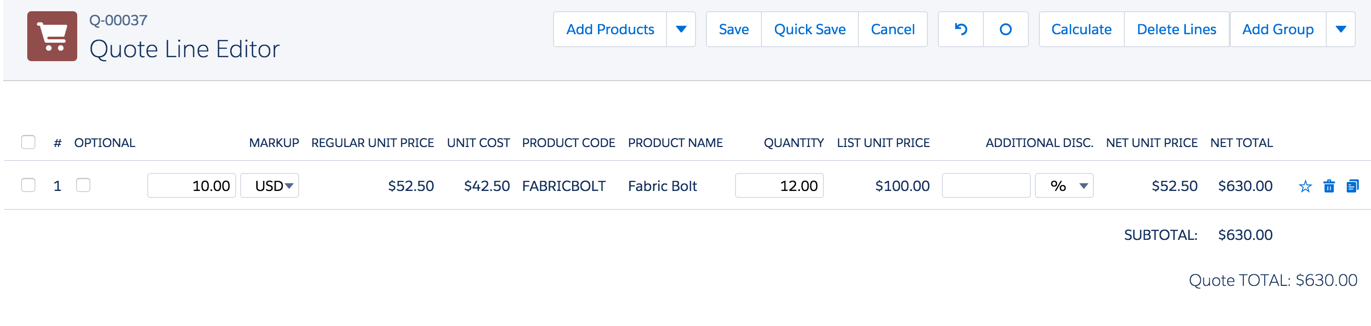
Your company sells fabric bolts at a cost of $50 per bolt. You’ve applied the
following discount schedule to your Fabric Bolt product’s Cost Schedule field.
Tier Name
Lower Bound
Upper Bound
Discount (%)
1–10
1
11
10
11–20
11
21
15
21–30
21
31
20
If your sales rep quotes 12 fabric bolts and applies a $10 markup, you end up with a net
total of $630.
$50 * .85 = $42.50 + $10 = $52.50 * 12 =
    $630.00
Did this article solve your issue?
Let us know so we can improve!
Loading
Salesforce Help | Article
Cookie Consent Manager
General Information
Required Cookies
Functional Cookies
Advertising Cookies
General Information
We use three kinds of cookies on our websites: required, functional, and advertising. You can choose whether functional and advertising cookies apply. Click on the different cookie categories to find out more about each category and to change the default settings.
Privacy Statement
Required Cookies
Always Active
Required cookies are necessary for basic website functionality. Some examples include: session cookies needed to transmit the website, authentication cookies, and security cookies.
Functional Cookies
Functional cookies enhance functions, performance, and services on the website. Some examples include: cookies used to analyze site traffic, cookies used for market research, and cookies used to display advertising that is not directed to a particular individual.
Advertising Cookies
Advertising cookies track activity across websites in order to understand a viewer’s interests, and direct them specific marketing. Some examples include: cookies used for remarketing, or interest-based advertising.