
You are here:
Global Attributes
Create a set of configuration attributes so that users can quickly assign the attributes to any number of product options. Each configuration attribute set is shown in a collapsible drawer below each product option in the configurator. This feature reduces the time spent creating product options if your options share some of the same attributes. (Salesforce CPQ Managed Package)
Required Editions
| Available in: Salesforce CPQ Winter ’18 and later |
When you create a configuration attribute record, you can choose whether its record type is Configuration Attribute or Global Attribute. Choosing Global Attribute lets you create the record without assigning it to bundle product. That way, you can use the attribute across several different bundles, or for only certain product options in one bundle. A global attribute needs only a name and a target product option field.
Global attributes use the following objects.
- Global Attribute
- A configuration attribute that you can assign to any product option. You can enable global attributes in your Salesforce CPQ package settings. Once enabled, when you create a configuration attribute, Salesforce CPQ lets you choose whether its record type is a configuration attribute or a global attribute.
- Since global attributes aren’t tied to a single bundle, you only have to define their name and target field. You’ll use attribute sets and product attribute sets to associate them your product options.
- Attribute Set
- An attribute set groups several global attributes together in the form of attribute items. After you create your global attributes, you create an attribute set and then create one attribute item in the set for each global attribute.
- Attribute Item
- An attribute item represents a global attribute that you want to assign to an attribute set. Create attribute items from their related list in the attribute set.
- Product Attribute Set
- A product attribute set associates an attribute set with a product option. Create product attribute sets from their related list in the attribute set.
- A product attribute set has a one-to-many relation with product options. This way, you can use the attribute set as a “bucket” to group several global attributes together. Then you can assign that collection of global attributes to several different product options.
View your product option’s attribute sets in the configurator by clicking the dropdown menu on the right-hand side of your product option. Here you can pick your attribute values as needed. Remember that a global attribute changes field values for only the product option it’s assigned to.

Let’s review how we could use global attributes with a CPU cooling bundle containing product options for a small cooling system, a medium cooling system, and a large cooling system.
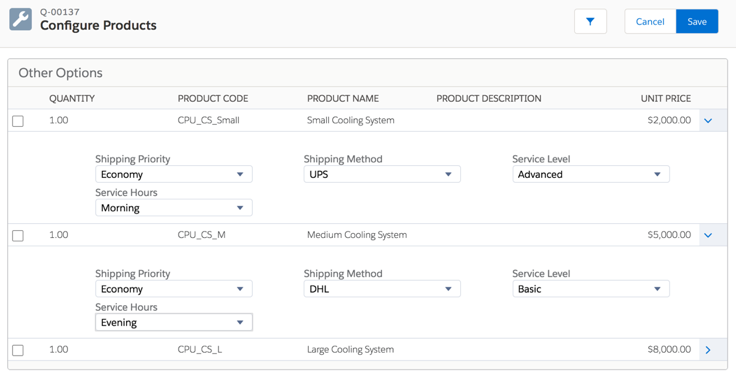
- We created global attributes for Shipping Priority, Shipping Method, Service Level, and Service Hours.
- We created one attribute set for shipping options and one attribute set for service options. We used two sets in case we have future product options where we want to assign only shipping options or only service options.
- The Service Options set contains two attribute items — one for service level and one for service hours. The Shipping Options set contains two attribute items as well — one for shipping method and one for shipping priority.
- Each attribute set contains three product attribute sets — one for each type of cooling system.
When we configure the CPU cooling bundle, Salesforce CPQ shows each global attribute as a picklist on each product option. Since each product option has its own product attribute set, you can adjust the attributes independently for each option. Click the arrow icon next to each product option to expand or collapse its global attributes.
- Enable Global Attributes
Global attributes are configuration attributes that you can assign to any product options in any number of bundles. Enable global attributes for use in your Salesforce CPQ org. (Salesforce CPQ Managed Package) - Create a Global Attribute
Create global attributes and associate them with one or more product options in one bundle or several bundles. Since global attributes aren’t limited to one bundle, you can save time setting up your bundles for sales rep configuration. (Salesforce CPQ Managed Package) - Considerations for Global Attributes
Keep a few things in mind when you’re working with global attributes. (Salesforce CPQ Managed Package)
