
Loading
Ongoing maintenance for Salesforce HelpRead More
Feature degradation | Gmail Email delivery failureRead More
Manage Your Quotes with CPQ
Table of Contents
Select Filters

          No results
          No results
          Here are some search tips

          Check the spelling of your keywords.
          Use more general search terms.
          Select fewer filters to broaden your search.

          Search all of Salesforce Help
          Multidimensional Quoting (MDQ) Products in Salesforce CPQ

          Multidimensional Quoting (MDQ) Products in Salesforce CPQ

          You can show a fixed-price subscription product in the quote line editor as one quote line broken into segments. Each segment represents a unit of time (quarter, month, year, or custom) and has pricing and a quantity independent of the line’s other segments. We call these products multi-dimensional quoting (MDQ) products. They’re useful if you want your sales reps to have detailed control over pricing specific units of time within one subscription. (Salesforce CPQ Managed Package)
          Required Editions

          Available in: Salesforce CPQ Spring ’15 and later

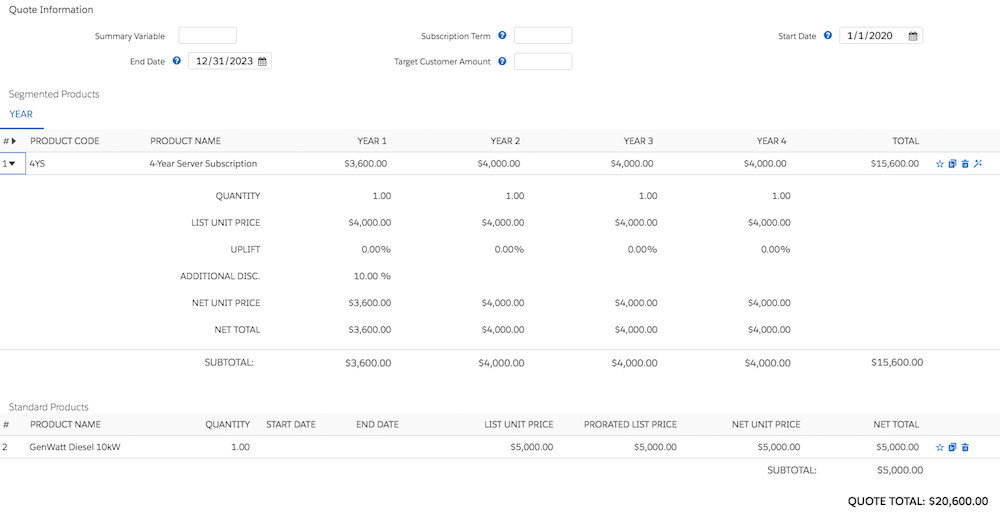
          Here’s a simple example of an MDQ product for a 12-month, $4,000 subscription quoted for four years.

          A sample MDQ product

          Segments are repeated over the quote’s term. In this case, our product has a subscription term of 12 months with yearly segments. So, Salesforce CPQ creates one segment for each year of the quote’s four-year term. Thus we have four segments with an initial price of $4,000 each. Each segment can be discounted or marked up independently of other segments, so we’ve also given a 10% discount to the first segment.

          Define segments on an MDQ product by creating a price dimension from your subscription product’s Price Dimensions related list. The price dimension also lets you control whether sales reps can edit the cost, quantity, or discounts of segments or whether the segments inherit editability of these fields from their parent product record.

          Quote lines for MDQ products appear by default in the Segmented Products table, while other quote lines in the Standard Products table. Sales reps can hide an MDQ line’s segments and move it to the standard table by clicking the segmentation icon The segmentation icon. Clicking the segmentation icon again moves the MDQ line back to the Segmented products table and shows its segments. The product field Default Pricing Table field also lets you control whether an MDQ product’s quote line appears in the segmented or standard table when added to a quote.

          Fixed-length MDQ products must use a subscription term that matches their dimension type. For example, a quarterly MDQ product must use a subscription term of 3, and a yearly MDQ product must use a subscription term of 12.

          Tip
          Tip To add a one-time charge, such as an installation fee, create a price dimension with a Type value of One-Time. Then, set its unit price to your desired value. The unit price overrides the product’s Price Book value. The one-time fee appears to the left of your segmented values in the line editor.
          Example
          Example Your company sells generators and provides an installation service for $1,000 and an ongoing manual subscription service for $500. You can use MDQ pricing to create a subscription product that handles the one-time fee and the subscription service. For example, you can set up the Generator Service product as follows.
          1. Create a product to represent the subscription.
            • Subscription Pricing: Fixed Price
            • Subscription Term: 12
            • List Unit Price: $500
          2. Create a price dimension to represent the subscription service. From your Generator Service product, go to the Price Dimensions related list and click New. Give your price dimension the following values.
            • Dimension Name: Yearly Service
            • Type: Year
          3. Create another price dimension to represent the one-time fee.
          • Dimension Name: Generator Installation
          • Type: One-Time
          • Unit Price: $500
           
          Loading
          Salesforce Help | Article