Quote line pricing guidance records include fields that track whether a sales rep viewed
the guidance in the quote line editor and whether they used the guidance’s target discount. When
used in reports, the fields help you determine whether pricing guidance improves
sales. (Salesforce CPQ Managed Package)
Required Editions
Available in: Salesforce CPQ Winter ’20 and later
When you use pricing guidance with quotes, Salesforce CPQ makes a quote line pricing guidance
record for the resulting quote line. This record represents the specific pricing guidance
applied to the quote line in the quote line editor. The quote line pricing guidance record
inherits the floor, norm, and target discount values from the product’s pricing guidance
record.
In Salesforce CPQ Winter ’20, we added two fields that let you track whether sales reps viewed
the guidance and whether they accepted its target discount.
Viewed
Salesforce CPQ selects this field when a sales rep clicks a quote line’s Pricing Guidance
icon, then saves or quick saves the quote.
Guidance Used
Salesforce CPQ selects this field when a sales rep applies an additional discount that
matches the Target Discount on the quote line’s pricing guidance.
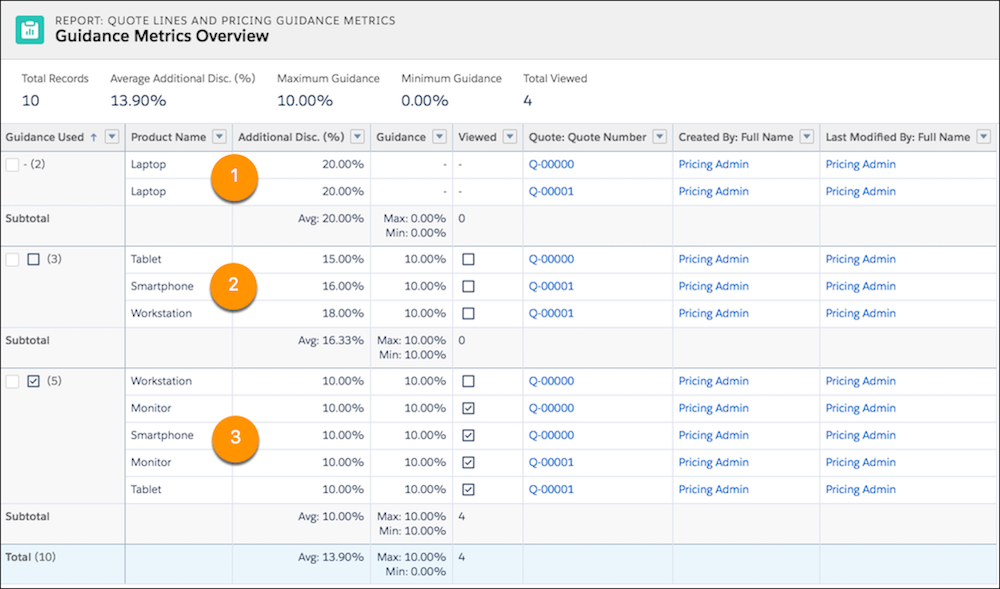
Example Here’s a simple report template that groups the rows by the Guidance Used field.
Group Rows
Guidance Used
Columns
Product Name
Additional Discount (%)
Guidance
Viewed
Quote: Quote Number
Created by: Full Name
Last Modified By: Full Name
Let’s run this report in a sample org. Since we grouped rows by the Guidance Used field,
the report shows us quote lines where pricing guidance wasn’t available (1), where pricing
guidance wasn’t used (2), and where pricing guidance was used (3).
Did this article solve your issue?
Let us know so we can improve!
Loading
Salesforce Help | Article
Cookie Consent Manager
General Information
Required Cookies
Functional Cookies
Advertising Cookies
General Information
We use three kinds of cookies on our websites: required, functional, and advertising. You can choose whether functional and advertising cookies apply. Click on the different cookie categories to find out more about each category and to change the default settings.
Privacy Statement
Required Cookies
Always Active
Required cookies are necessary for basic website functionality. Some examples include: session cookies needed to transmit the website, authentication cookies, and security cookies.
Functional Cookies
Functional cookies enhance functions, performance, and services on the website. Some examples include: cookies used to analyze site traffic, cookies used for market research, and cookies used to display advertising that is not directed to a particular individual.
Advertising Cookies
Advertising cookies track activity across websites in order to understand a viewer’s interests, and direct them specific marketing. Some examples include: cookies used for remarketing, or interest-based advertising.