The next time you're closing a deal, check out pricing guidance to view target discounts
based on historical sales information. (Salesforce CPQ Managed Package)
Required Editions
Available in: Salesforce CPQ+ Summer ’19 and later
If an admin enabled pricing guidance for a product in your quote, the guidance appears as the
icon in quote lines for that product.
When you see the icon on one of your quote lines, click it to
open pricing guidance.
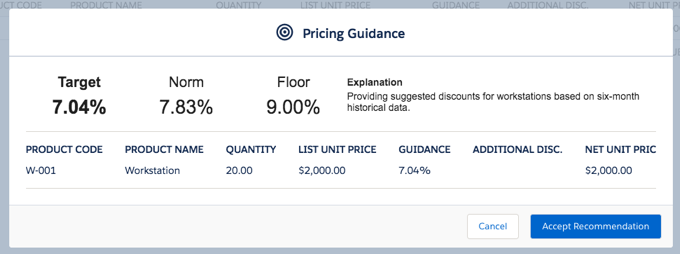
Salesforce CPQ shows the pricing guidance for your quote line. Review your suggested discounts.
The target discount represents an ideal discount percentage that supports customer
purchase without discounting your quote line too heavily.
The norm discount represents an average discount for this product based on historical
pricing trends.
The floor discount represents a high discount only for special circumstances, such as a
final incentive to close a deal or to prevent the attrition of a long-time customer.
Apply a discount. To apply the target discount, click Accept
Recommendation.
For target discounts, click Accept Recommendation.
For norm and floor discounts, enter that value manually in your quote line's Additional
Discount field.
Example
Additional discounts may require approvals based on your org's approval settings.
Admins often set up pricing guidance so that suggested discounts vary as the quote line's
quantity changes. If you edit your quote line's quantity and reopen pricing guidance, you may
see different suggested discounts. If you already accepted a discount and edit your quote
line's quantity, your Additional Discount may also change.
If a product has pricing guidance and a discount schedule, the quote line editor always
uses pricing guidance and ignores the discount schedule, even if the guidance is
inactive.
Did this article solve your issue?
Let us know so we can improve!
Loading
Salesforce Help | Article
Cookie Consent Manager
General Information
Required Cookies
Functional Cookies
Advertising Cookies
General Information
We use three kinds of cookies on our websites: required, functional, and advertising. You can choose whether functional and advertising cookies apply. Click on the different cookie categories to find out more about each category and to change the default settings.
Privacy Statement
Required Cookies
Always Active
Required cookies are necessary for basic website functionality. Some examples include: session cookies needed to transmit the website, authentication cookies, and security cookies.
Functional Cookies
Functional cookies enhance functions, performance, and services on the website. Some examples include: cookies used to analyze site traffic, cookies used for market research, and cookies used to display advertising that is not directed to a particular individual.
Advertising Cookies
Advertising cookies track activity across websites in order to understand a viewer’s interests, and direct them specific marketing. Some examples include: cookies used for remarketing, or interest-based advertising.