Apply Manager Judgment to Opportunities in Pipeline Forecast
To create the most accurate forecast possible, apply your judgment as a forecast manager
about whether you consider a subordinate’s opportunity part of your forecast. Then you have the
details about the total value of the opportunities when you review and adjust the total Commit
forecast.
Required Editions
Available in: Lightning Experience
Available in: Professional, Performance, and Developer
Editions and in Enterprise and Unlimited Editions with Sales
User Permissions Needed
To use Salesforce Forecasting:
View All Forecasts
OR
Allow Forecasting
OR
Delegated forecast
manager status
To access role-based forecasts in Lightning Experience:
View Roles and Role Hierarchy
To apply judgments and adjust forecasts:
Override Forecasts
Note Applying manager judgments is supported in the desktop site only.
As a forecast manager, you can apply judgment to opportunities that your subordinates own. You
can’t apply judgments to opportunities that you own that are part of your forecast.
On the forecasts page, select the forecast value that you want to review.
The opportunities that roll up to that forecast are shown in the opportunities
list.
In the Manager Judgment field, indicate whether the opportunity is included or excluded
from the forecast
Save your changes.
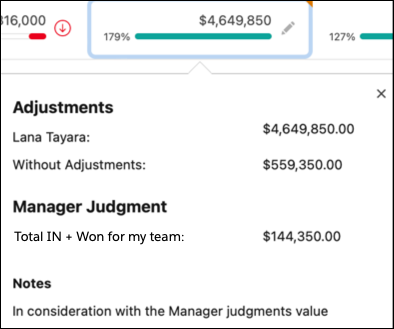
The total of the opportunities that have closed and opportunities judged as included, or “in,”
the forecast are shown when hovering over the Commit forecast. To see the details, hover over
the icon.
If Salesforce is configured to show adjustment details in columns, hover over the My Commit
forecast to see the manager’s judgment Total IN value.
We use three kinds of cookies on our websites: required, functional, and advertising. You can choose whether functional and advertising cookies apply. Click on the different cookie categories to find out more about each category and to change the default settings.
Privacy Statement
Required Cookies
Always Active
Required cookies are necessary for basic website functionality. Some examples include: session cookies needed to transmit the website, authentication cookies, and security cookies.
Functional Cookies
Functional cookies enhance functions, performance, and services on the website. Some examples include: cookies used to analyze site traffic, cookies used for market research, and cookies used to display advertising that is not directed to a particular individual.
Advertising Cookies
Advertising cookies track activity across websites in order to understand a viewer’s interests, and direct them specific marketing. Some examples include: cookies used for remarketing, or interest-based advertising.