
You are here:
View Prospect Engagement in the Work Queue
Prioritize your sales outreach based on prospect engagement shown in the My Feed tab.
Required Editions
| Available in: Lightning Experience |
| Available with Sales Engagement, which is included with Sales in Performance, Einstein 1, and Unlimited Editions, and available for an extra cost in Professional and Enterprise Editions. Sales Engagement is also available for an extra cost in Service and Lightning Platform. |
| User Permissions Needed | |
|---|---|
| To view prospect engagement: | Sales Engagement User or Sales Engagement User Included OR Sales Engagement Cadence Creator Included |
The My Feed tab of the Work Queue shows alerts when prospects engage with tracked emails, so you can follow up immediately. You can also see an alert when a record is assigned to you.
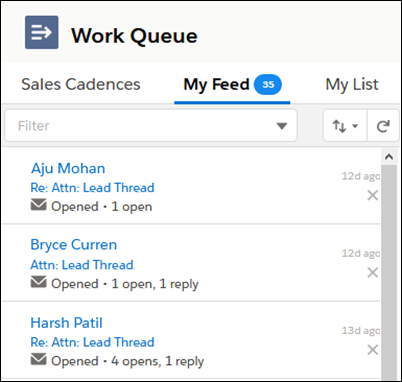
The My Feed tab shows the last 30 days of engagements. Sales reps can sort and filter the list.
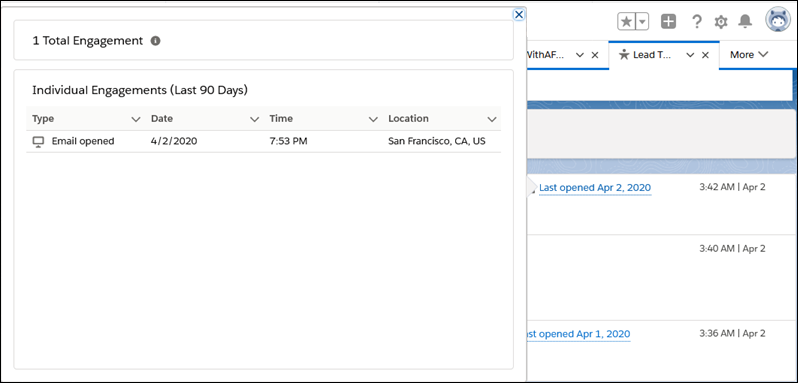
If you use Einstein Activity Capture, hovering over the Last Opened Date of an email shows the Engagement related list.
If you don’t use Einstein Activity Capture, click the email subject and then the Engagement tab to see the list.
The Engagement list shows all engagements for the last 90 days. Sales reps see dates and times when recipients opened emails or clicked links, and how many times they interacted, in a chronological list. Use the engagement details to identify the most interested prospects for prompt follow-up.
