You are here:
Reference Fields for Your Sales Strategy
Develop a sales strategy that includes only the relevant data that you specify in Legacy Sales Planning.
Required Editions
| Available in: both Salesforce Classic (not available in all orgs) and Lightning Experience |
| Available for an additional cost in: Enterprise, Performance, Unlimited, and Developer Editions with Sales Planning in English only, and only if you have Web Services API enabled |

Feature is scheduled for retirement as of Summer'26. See Sales Planning version 1 Retirement
Specifying the Kinds of Records and Reference Data for Your Sales Strategy
You specify assignment objects whose records you later assign throughout your sales hierarchy, such as accounts, contacts, or leads. The number of records in an assignment object can impact performance. If you specify an object with more than 1 million records, test thoroughly for performance issues. For the best performance, specify objects with fewer than 1 million records.
Sales Planning adds common reference fields specific to the objects that you specify. Then you add any other reference fields that factor into your sales strategy, such as Account ID, Employees, and Annual Revenue. At a minimum, sales plans require:
- Record ID
- Record Name
- Latitude and longitude coordinates for planning that include boundaries and visualizing records on the map
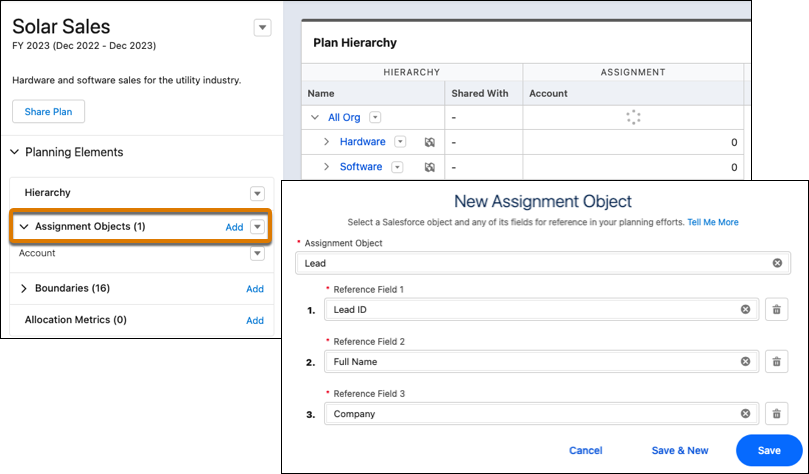
To add more reference fields, click Add Reference. Select only the fields relevant to your sales strategy. Otherwise you use more storage against your data allocation than what’s necessary. For the best performance, include no more than 20 fields.
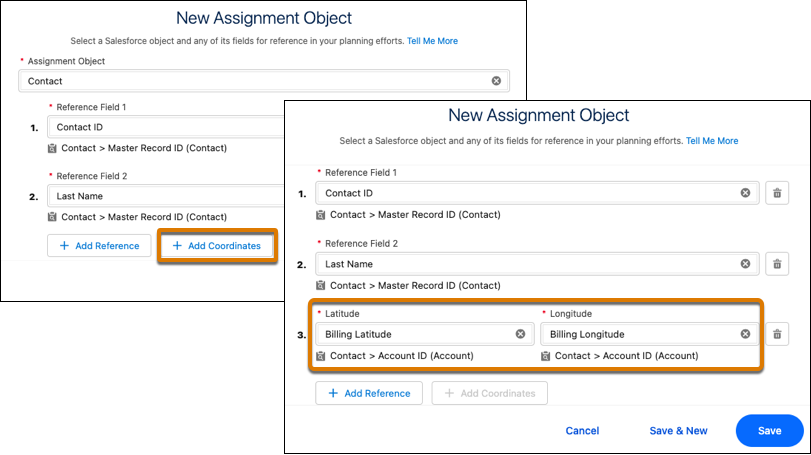
To plan your strategy using boundaries and visualize records on a map, include fields with latitude and longitude coordinates. Click Add Coordinates, and then select the coordinate fields to include in your sales plan.
Adjusting Your Assignment Object’s Reference Fields
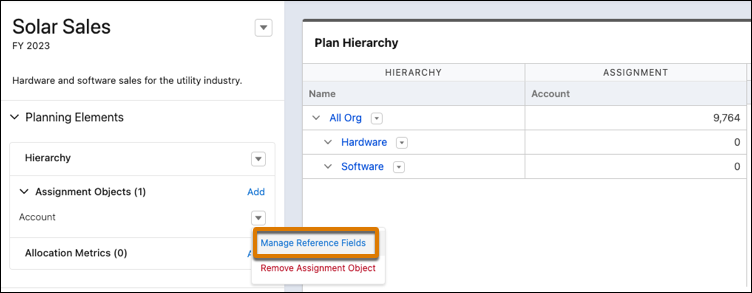
If you require more reference fields for your assignment object, click Manage Reference Fields. From there, select other reference fields from Salesforce or import external ones using a CSV file.