
Loading
Manage Your Billing Processes with Salesforce Billing
Table of Contents
Select Filters

          No results
          No results
          Here are some search tips

          Check the spelling of your keywords.
          Use more general search terms.
          Select fewer filters to broaden your search.

          Search all of Salesforce Help
          Lifecycle-Managed Assets

          Lifecycle-Managed Assets

          Lifecycle-managed assets and related objects contain information about the type and timing of changes to the asset. After your business enables Customer Asset Lifecycle Management, a developer or integrator builds a custom system to automatically generate and update lifecycle-managed assets and related objects. The system uses data from order products, work order line items, or an external system to generate the lifecycle-managed assets that you see in Salesforce. (Salesforce Billing Managed Package)
          Required Editions

          Available in Lightning Experience in Professional, Enterprise, Unlimited, and Developer Editions with Salesforce CPQ Plus and Salesforce Billing

          When a lifecycle-managed asset is generated, the Lifecycle-managed asset field is selected. You can’t switch an asset to a lifecycle-managed asset or the reverse.

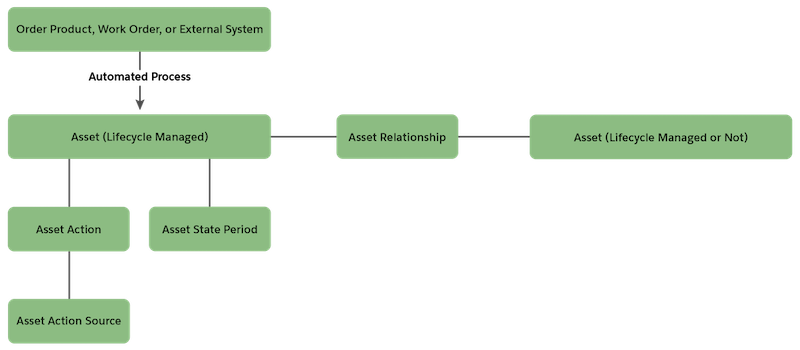
          With a lifecycle-managed asset, an asset action represents changes made to the asset, and an asset state period denotes the time span when the changes apply. An asset action source provides an optional way to track the sources of changes. Together, these three child objects provide visibility into changes made to a lifecycle-managed asset throughout its lifecycle.

          Diagram: The Asset object is related to the Asset Relationship object. The Asset Action object (changes to an asset) and Asset State Period object (quantity and other values for a specified period) are related to the Asset object. The Asset Action Source object is a child of the Asset Action object.

          The system or your Salesforce admin can create relationships between lifecycle-managed assets and other assets, lifecycle-managed or not. Here are some examples:

          • In an asset relationship with a type of Upgrade, the primary asset is the upgraded asset, and the related asset is the original asset.
          • In an asset relationship with a type of Coverage, the primary asset is covered by the related asset.

          Related assets have separate lifecycles.

           
          Loading
          Salesforce Help | Article