View the current quantity, amount, and monthly recurring revenue (MRR) for an asset, and
see trends throughout the asset’s lifecycle. (Salesforce Billing Managed Package)
Required Editions
Available in Lightning Experience in Professional, Enterprise, Unlimited, and
Developer Editions with Salesforce CPQ Plus and Salesforce Billing
User Permissions Needed
To view the dashboard and details for lifecycle-managed assets:
Read on the Asset and Asset Action objects
Navigate to a lifecycle-managed asset to see its dashboard.
If you don’t see the dashboard, ask your Salesforce admin about Customer Asset Lifecycle
Management.
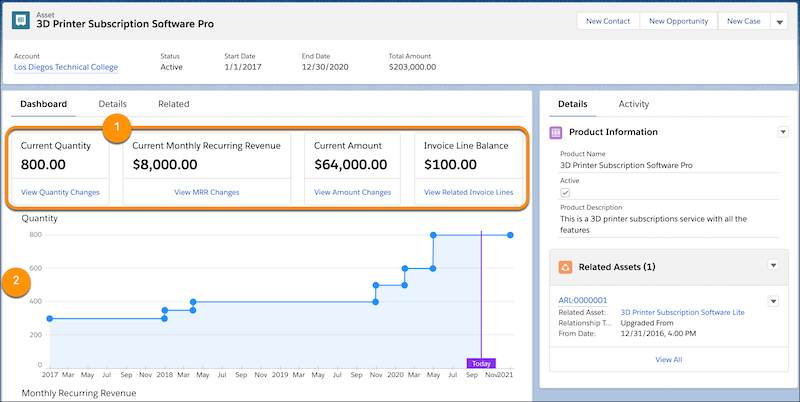
The dashboard for the asset shows the current quantity, MRR, amount, and invoice
line balance as of today’s date (1). It’s updated at the end of the current period in the
asset’s lifecycle.
The dashboard also includes charts showing changes in quantity and
MRR throughout the asset’s lifecycle (2).
Use the View links in the dashboard to see details on the quantity,
MRR, and amount.
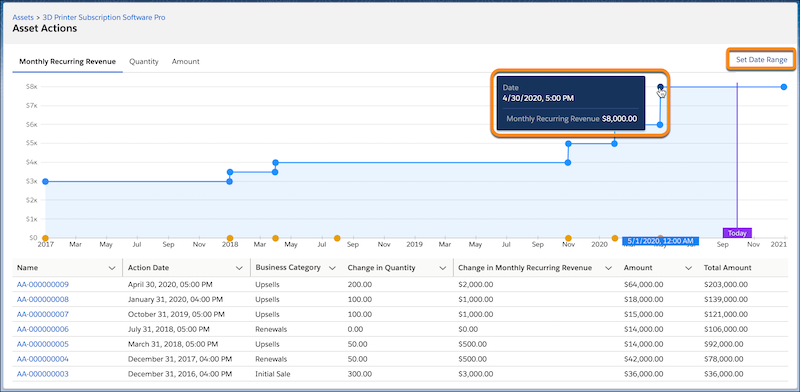
Each asset action tab shows the effect of each change or cancellation on the
quantity, MRR, and amount.
On the asset action page, narrow your view of a chart by
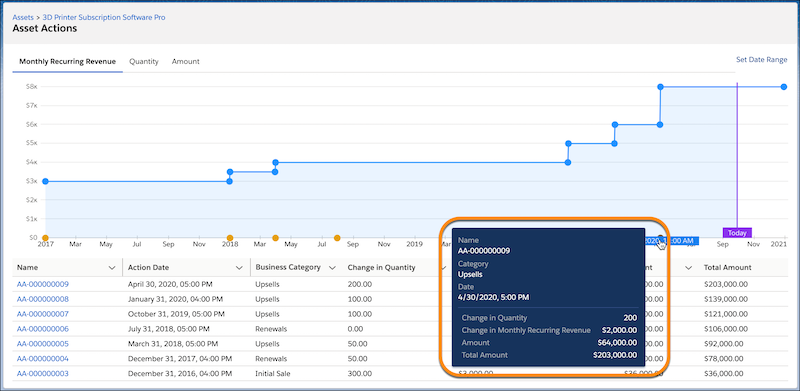
clicking Set Date Range. To see details about a change, hover over a
dot. A blue dot in a chart indicates an asset state period change, and an orange dot indicates
an asset action change.
Some lifecycle-managed assets show asset action sources, such as a
Salesforce order product or work order line item, or a reference to another system. Click the
item under Name, and then click the Related tab.
Some lifecycle-managed assets show the
business category of each change, such as initial sale or renewals. Include these categories
in reports to understand where revenue is rising or falling.
View Related Invoice Lines opens the Invoice Lines related
list.
We use three kinds of cookies on our websites: required, functional, and advertising. You can choose whether functional and advertising cookies apply. Click on the different cookie categories to find out more about each category and to change the default settings.
Privacy Statement
Required Cookies
Always Active
Required cookies are necessary for basic website functionality. Some examples include: session cookies needed to transmit the website, authentication cookies, and security cookies.
Functional Cookies
Functional cookies enhance functions, performance, and services on the website. Some examples include: cookies used to analyze site traffic, cookies used for market research, and cookies used to display advertising that is not directed to a particular individual.
Advertising Cookies
Advertising cookies track activity across websites in order to understand a viewer’s interests, and direct them specific marketing. Some examples include: cookies used for remarketing, or interest-based advertising.