
You are here:
Lightning Sync Design and Data Flow
Lightning Sync is designed to simplify the data flow between Salesforce and your email service.
Lightning Sync connects the core Salesforce database with your email server directly, with no email client required to maintain synchronization. This design simplifies the connection process and makes Lightning Sync a superior solution to Salesforce for Outlook, which requires a connection to individual Outlook user accounts. Calls to sync are made from an automated process on the Salesforce core stack to your email service, regardless of which data store has been updated. Users don’t directly invoke communication between the systems. Likewise, the email service doesn’t initiate communication.
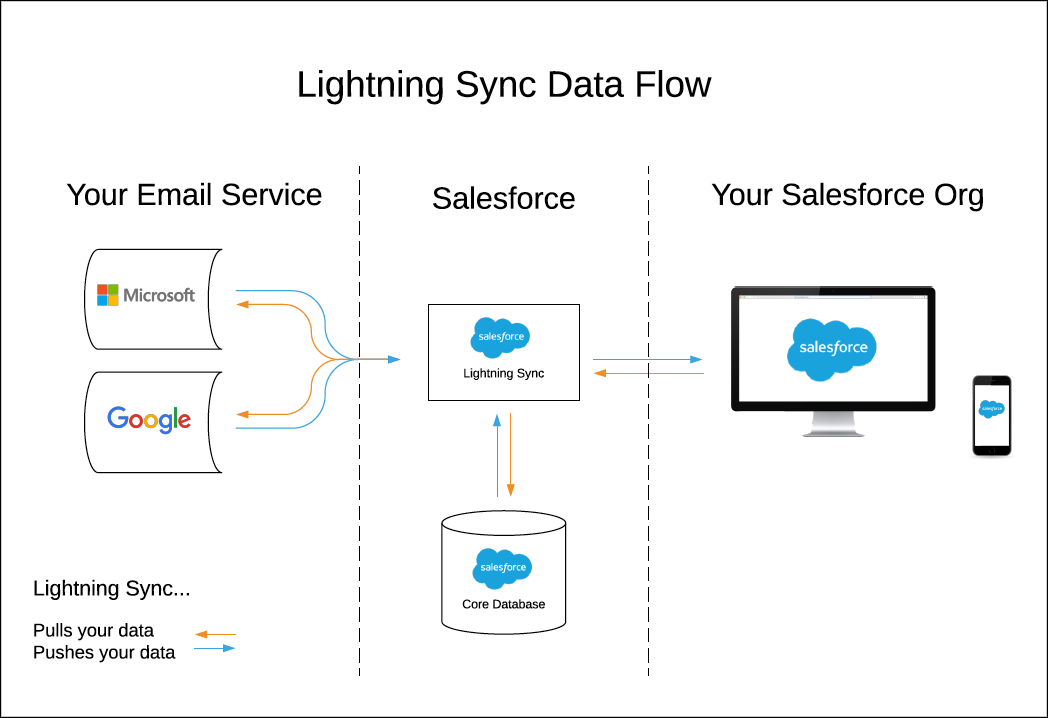
With Lightning Sync, Data is stored in two locations only: users’ individual email services and the Salesforce core database.
