How Match Keys Are Generated and Used in Matching Rules
When a matching rule runs, it applies one or more match key formulas before applying
a comprehensive matching equation. Match keys help to increase the performance of duplicate
rules through a preliminary comparison that narrows the matches to the 100 most likely
duplicate records. Then the rule applies the matching equation only to those likely
matches.
Required Editions
Available in: Lightning Experience and Salesforce Classic
Available in: Essentials, Professional,
Enterprise, Performance, Unlimited, and
Developer Editions
In rare instances, match keys result in undetected duplicates, but generally, match keys
greatly improve the performance of duplicate rules.
How Match Keys Are Generated
The matching equation that determines the arrangement of the fields is rewritten
into a standardized format that translates the OR statements into AND
statements.
Values for fields in the matching rule are normalized.
A match key is generated using the field combinations specified in the
standardized field format. A matching rule can have multiple match keys. A
custom matching rule can have up to 10 match keys; you’re prevented from saving
a matching rule that requires more.
The match key is used to combine normalized field values for each record.
Note No match key is generated for the Title field.
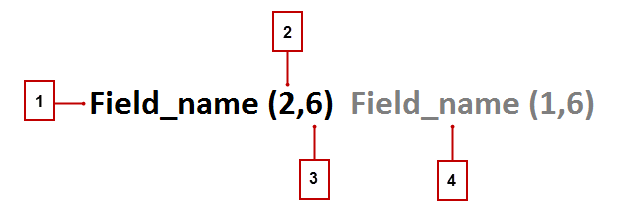
The match key notation shows which fields and which characters in those fields are
used in a match key.
The field used in the match key (1).
Number of words (or tokens) in the field value to include in the match key (2).
If no number is present, all words are included.
Number of characters per word to include in the match key (3). If no number is
present, all characters are included.
Additional field used in the match key (4).
Match Keys for Standard and Custom Rules
Standard matching rules use predefined match keys. Custom rules that contain standard
field combinations also use predefined match keys. For example, the matching rule
equation for a custom contact matching rule is (First Name AND Last Name AND
Company). A fuzzy matching method is selected for at least one field. The notation
for its match key is: First_Name (1,1) Last_Name Company (2,6).
For nonstandard field combinations, custom rules use keys generated from their
corresponding matching criteria.
Did this article solve your issue?
Let us know so we can improve!
Loading
Salesforce Help | Article
Cookie Consent Manager
General Information
Required Cookies
Functional Cookies
Advertising Cookies
General Information
We use three kinds of cookies on our websites: required, functional, and advertising. You can choose whether functional and advertising cookies apply. Click on the different cookie categories to find out more about each category and to change the default settings.
Privacy Statement
Required Cookies
Always Active
Required cookies are necessary for basic website functionality. Some examples include: session cookies needed to transmit the website, authentication cookies, and security cookies.
Functional Cookies
Functional cookies enhance functions, performance, and services on the website. Some examples include: cookies used to analyze site traffic, cookies used for market research, and cookies used to display advertising that is not directed to a particular individual.
Advertising Cookies
Advertising cookies track activity across websites in order to understand a viewer’s interests, and direct them specific marketing. Some examples include: cookies used for remarketing, or interest-based advertising.