
Loading
Feature Disruption - Service Cloud VoiceRead More
Feature degradation | Gmail Email delivery failureRead More
Sales Productivity
Table of Contents
Select Filters

          No results
          No results
          Here are some search tips

          Check the spelling of your keywords.
          Use more general search terms.
          Select fewer filters to broaden your search.

          Search all of Salesforce Help
          Automatic Account Assignments for Synced Contacts in Salesforce for Outlook (Retiring)

          Automatic Account Assignments for Synced Contacts in Salesforce for Outlook (Retiring)

          After syncing contacts from Outlook, Salesforce for Outlook tries to automatically assign them to accounts.

          Required Editions

          Available in: Salesforce Classic
          Available in: Lightning Experience, if Salesforce Classic is available in your org.
          Available with the purchase of Sales Cloud or Government Cloud in: Personal, Contact Manager, Professional, Enterprise, Performance, Unlimited, and Developer Editions
          User Permissions Needed
          To assign accounts: Read on accounts and Edit on contacts
          To create new accounts:

          Create on accounts and Edit on contacts

          AND

          Show Quick Create

          Important
          Important Full product retirement for Salesforce for Outlook is scheduled for December 2027. See Salesforce for Outlook Retirement. To keep integrating Microsoft Outlook with Salesforce, check out our next-generation products: the Outlook integration and Einstein Activity Capture. See Move from Salesforce for Outlook (Retiring) to the Next-Generation Products.

          After syncing contacts from Outlook, Salesforce for Outlook tries to automatically assign them to accounts, as shown in this diagram.
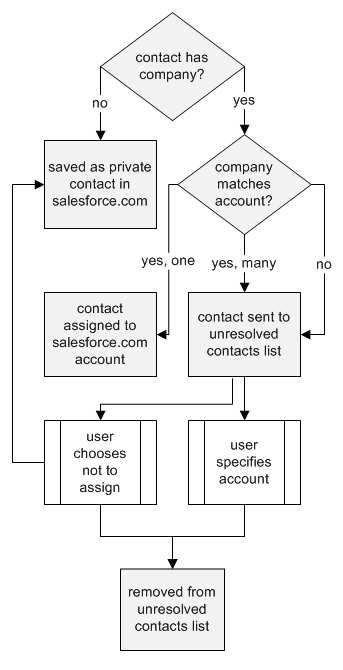
          Account assignment flowchart

          This table describes the account assignment process.

          If Then
          A contact's company matches a single Salesforce account The contact is assigned to that account.
          A contact's company matches many Salesforce accounts or none The contact is sent to My Unresolved Items in Salesforce, which you can access from the Contact home page or the Salesforce for Outlook system tray application. You can use this list to manually assign contacts to existing accounts, create new accounts, or confirm that contacts are private.
          A contact doesn't have a company name The contact is treated as a private contact and is not sent to My Unresolved Items.
          A contact's company changes in Outlook If a matching account is found in Salesforce, the contact is assigned to that account. Otherwise, the contact is sent to My Unresolved Items to be resolved.
          An unresolved contact is deleted in Outlook The contact is removed from My Unresolved Items the next time you open the list.
          An unresolved contact is changed in Outlook The contact record is updated in My Unresolved Items. If the contact's company changes, Salesforce checks to see if that information matches any existing accounts and assigns it to an account if it finds a match.
           
          Loading
          Salesforce Help | Article