
You are here:
Define Account Rules
The Account Score helps you analyze your next potential customer. The Account Score is calculated based on the Engagement, Fit, and Intent scores, based on the percentage weights provided.
Required Editions
| Available in: Lightning Experience |
| Available with Sales Engagement, which is included with Sales in Performance, Unlimited Editions, Agentforce 1 Edition, and available for an extra cost in Professional and Enterprise Editions. Sales Engagement is also available for an extra cost in Service and Lightning Platform. |

Important Prospecting Center is scheduled for retirement in all Salesforce orgs
as of April, 2026. For existing customers, Prospecting Center remains available till April
2027.
| User Permissions Needed | |
|---|---|
| To give users access to the Sales Engagement app: | Sales Engagement User |
Before you define the Account rules, make sure that Prospecting Center is enabled.
Here you can specify the overall impact of each score on the account score and adjust the Account Scoring criteria to score the accounts.
- Go to the Prospecting Center setup page.
- Click Configure next to Configure Account Scoring. The Scoring Rules page appears.
-
Adjust the Account Score slider to define the impact of the Engagement, Fit, and Intent
Scores on the overall Account Score. By default, the Fit Score and Engagement Score is set to
50% each, and the Intent Score is disabled. You can choose to enable Intent Score based on your
preferences.
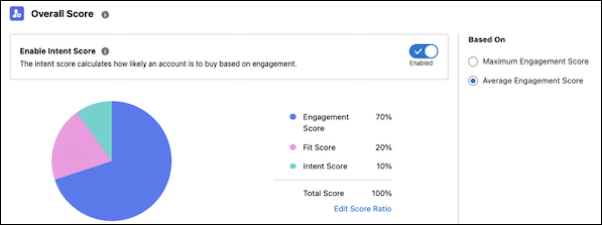
 Note Make sure that the sum of the weights for the Engagement, Fit, and Intent scores is 100.
 - To save your changes, click Publish.

Example
If you want the Engagement and the Fit Score to have equal impact and the Intent score to have a higher impact in calculating the Account Score, adjust the slider to 30% for the Engagement and the Fit Scores and 40% for the Intent Score.
Did this article solve your issue?
Let us know so we can improve!
