
You are here:
Find Your Next Customer With Prospecting Center
Get an all-in-one view of your accounts and their scores, with multiple ways to find your next prospects, depending on how you want them to be categorized. You can prioritize them based on either segments or scores. You can see scores for all accounts or dive into each account for more details.
Required Editions
| Available in: Lightning Experience |
| Available with Sales Engagement, which is included with Sales in Performance, Unlimited Editions, Agentforce 1 Edition, and available for an extra cost in Professional and Enterprise Editions. Sales Engagement is also available for an extra cost in Service and Lightning Platform. |

Find Prospecting Center
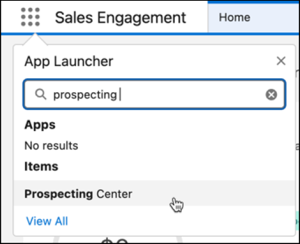
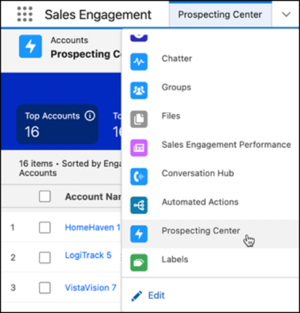
Two ways to open Prospecting Center are available.
- Click the App Launcher, type Prospecting Center, and then click Prospecting
Center. The Prospecting Center app opens in a new tab.
- From the Sales Engagement app, choose Prospecting Center from the
Navigation menu.
View Account Details
To view the details of an account, click  to open the details in a side panel.
Prospecting Center shows only those accounts owned by you and your subordinates. To view
details of all factors contributing to a score, click the score.
to open the details in a side panel.
Prospecting Center shows only those accounts owned by you and your subordinates. To view
details of all factors contributing to a score, click the score.
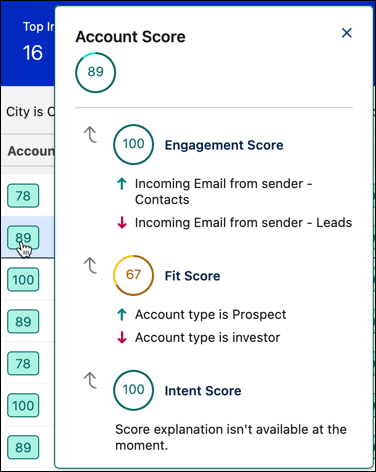
The Account score is an aggregate of Engagement, Fit, and Intent scores, based on your selections and the assigned % weights to each score.
- Engagement Score
- This score indicates how actively the individuals in this account typically interact with your sales communications.
- Fit Score
- This score indicates how closely an account matches the characteristics of an ideal customer for your business.
- Intent Score
- This score indicates buyers who are showing strong purchasing intentions based on their actions in the digital and physical worlds.
Find Prospects by Segments
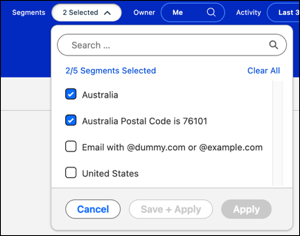
Segments are attributes of an account, based on which you can categorize your prospects. Segmenting your prospects helps you tailor strategies to direct your sales efforts in the right direction. Your sales teams can then use these segments to target their efforts, personalize their approach, and improve their overall sales performance.
For example, if you're targeting manufacturing customers in California, you can create segments such as Manufacturing and California. By selecting these segments, you can focus your sales efforts on the customers who are most likely to be interested in your products or services.

Find Prospects By Scores
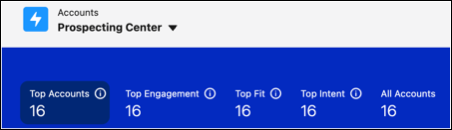
Scores help you find your best prospect, with just a click. Accounts with top scores can turn out to be your prospects.


- Add Prospects to a Cadence in Prospecting Center
Adding a prospect to a cadence streamlines your outreach efforts by automating and scheduling communications. It helps make sure that follow-ups are consistent and timely without requiring manual effort for each interaction. This structured approach saves time, as it allows you to manage multiple prospects simultaneously with a uniform strategy.
