We use three kinds of cookies on our websites: required, functional, and advertising. You can choose whether functional and advertising cookies apply. Click on the different cookie categories to find out more about each category and to change the default settings.
Privacy Statement
Required Cookies
Always Active
Required cookies are necessary for basic website functionality. Some examples include: session cookies needed to transmit the website, authentication cookies, and security cookies.
Functional Cookies
Functional cookies enhance functions, performance, and services on the website. Some examples include: cookies used to analyze site traffic, cookies used for market research, and cookies used to display advertising that is not directed to a particular individual.
Advertising Cookies
Advertising cookies track activity across websites in order to understand a viewer’s interests, and direct them specific marketing. Some examples include: cookies used for remarketing, or interest-based advertising.
ConsentLeg.Interest
label
label
label
label
Select An Org
Modal Body...
Salesforce Enforces New Security Requirements in Summer 2026Read More
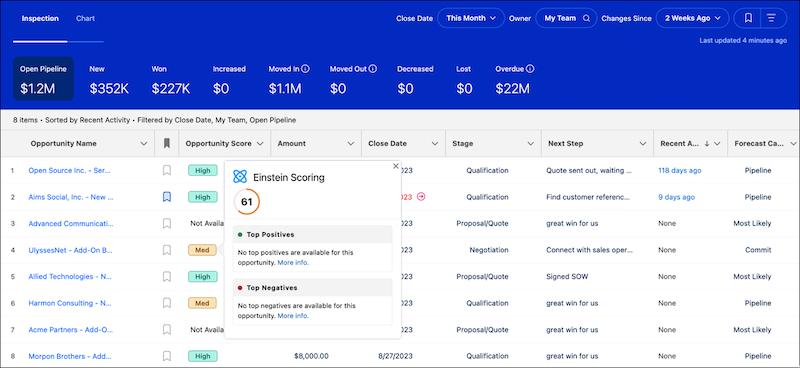
Opportunity scores tell you the likelihood that an opportunity will be won. For each
opportunity score, Einstein shows the positive and negative factors that contribute the most to
the score. In Pipeline Inspection, opportunity scores are shown in tiers instead of numeric
scores. When the score goes up or down a tier, a red or green arrow indicates the
change.
The color-coded tiers are shown in the Pipeline Inspection opportunity list in place of the
1–99 scores traditionally shown in opportunities. The opportunity score tiers and thresholds
are:
High: 67–99
Med: 34–66
Low: 1–33
Opportunity Score Change Alerts
When an opportunity score changes enough to move up or down a tier, the change is
highlighted with an arrow to the tier in the Pipeline Inspection list view. A green up arrow
shows that the opportunity score has increased from its prior score. A red down arrow shows
that the opportunity score has decreased from its prior score.