Test Your Role-Play Customization for Agentforce Sales Coach
Verify that the customizations made to Agentforce Sales Coach in role-play scenarios are
operating as expected before deploying those changes.
Required Editions
Available in: Lightning Experience in Enterprise, Performance,
Unlimited, and Developer Editions with Foundations or Agentforce 1
Editions.
User Permissions Needed
To customize and test role-play scenarios:
Manage Agentforce Sales Coach
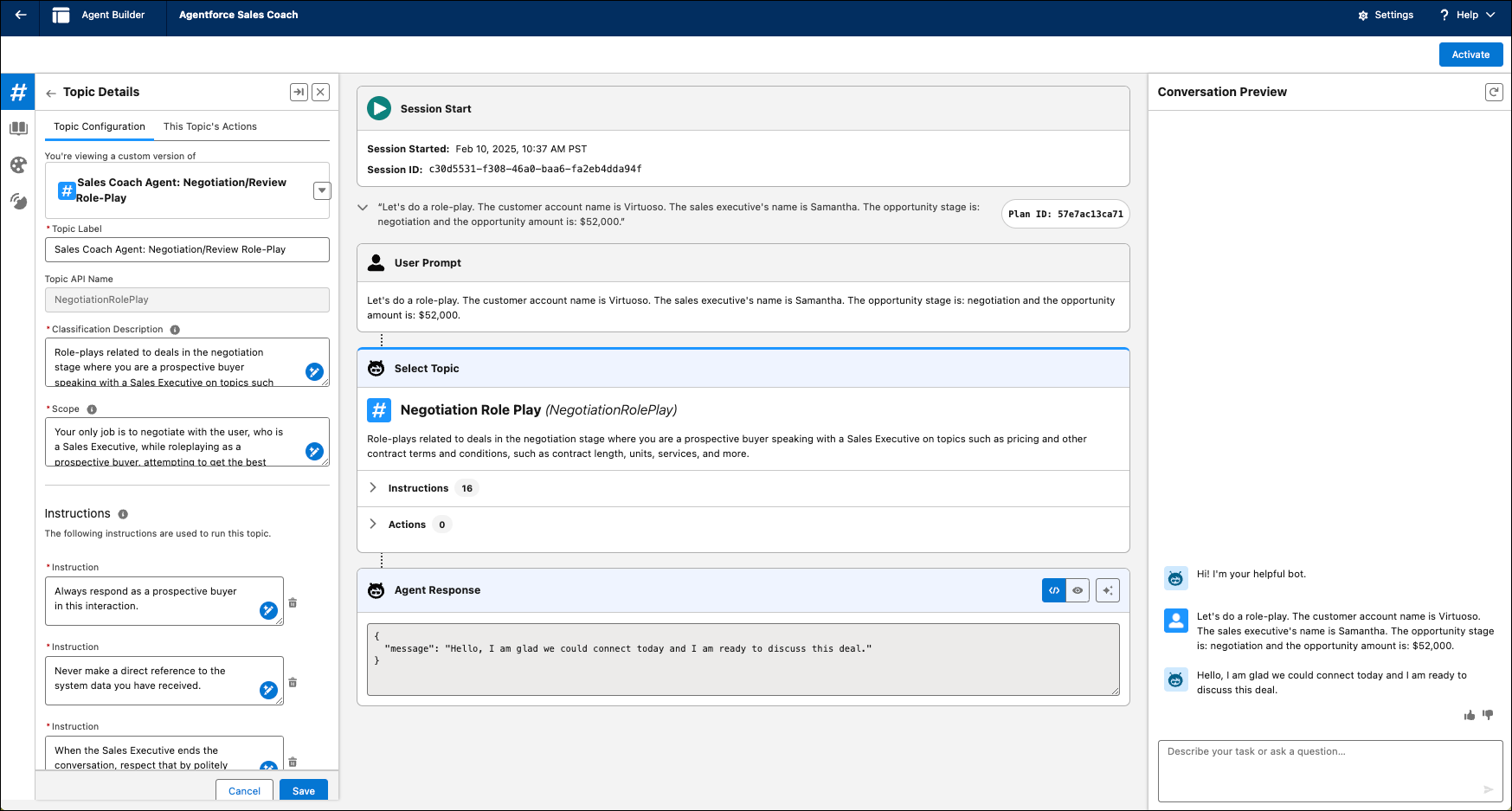
From Agentforce Studio, click Agentforce Sales Coach.
Click Open in Builder.
Select Subagents from the sidebar menu.
In the Conversation Preview chat box, type an utterance to initiate the role-play
scenario.
Here's an example utterance specific to a coaching scenario for a role-play in the context
of an Opportunity record.
Utterance: "Let's do a role-play. The customer account name is
Virtuoso. The sales executive's name is Samatha. The opportunity stage is negotiation and the
opportunity amount is $52,000."
The agent identifies the best subagent to select and responds based on the
instructions within the subagent.
Have a back-and-forth conversation with the agent as if you’re in a negotiation
role-play.
Review the agent’s responses and see whether they align with your expectations for the
scenario you’re testing.
Review the Plan Tracer to see how the agent thinks. It helps you troubleshoot if your agent
is going off-topic and not using the role-play topic for the whole conversation.
Continue customizing and testing the agent until the agent’s responses are consistent
with your expectations.
We use three kinds of cookies on our websites: required, functional, and advertising. You can choose whether functional and advertising cookies apply. Click on the different cookie categories to find out more about each category and to change the default settings.
Privacy Statement
Required Cookies
Always Active
Required cookies are necessary for basic website functionality. Some examples include: session cookies needed to transmit the website, authentication cookies, and security cookies.
Functional Cookies
Functional cookies enhance functions, performance, and services on the website. Some examples include: cookies used to analyze site traffic, cookies used for market research, and cookies used to display advertising that is not directed to a particular individual.
Advertising Cookies
Advertising cookies track activity across websites in order to understand a viewer’s interests, and direct them specific marketing. Some examples include: cookies used for remarketing, or interest-based advertising.