
Loading
Salesforce Enforces New Security Requirements in Summer 2026Read More
Sales Basics
Table of Contents
Select Filters

          No results
          No results
          Here are some search tips

          Check the spelling of your keywords.
          Use more general search terms.
          Select fewer filters to broaden your search.

          Search all of Salesforce Help
          See an Overview of Metrics, Goals, Suggestions, Tasks, and Activities in Seller Home

          See an Overview of Metrics, Goals, Suggestions, Tasks, and Activities in Seller Home

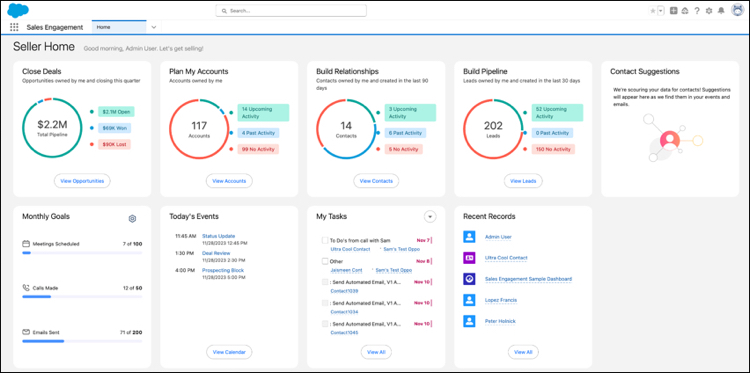
          Sales team members can start their day with a bird’s eye view of their business. Seller Home shows users an overview of their opportunities, accounts, leads, and contacts, along with their day’s agenda. Seller Home also lets users set goals and track progress and view their to-do items, recent records, and contact suggestions from Einstein.
          Required Editions

          Available in: Developer, Enterprise, Professional, Unlimited editions

          With useful information available at a glance, sales reps can get oriented faster and choose what to do next. Seller Home includes:

          • Opportunity overview
          • Account overview
          • Lead overview
          • Contact overview
          • Weekly or monthly goals
          • Today's Events
          • To-do items
          • Recent Records
          • Contact suggestions—identified by Einstein from a user’s emails and events
          The Seller Home page.

          Seller Home is the default Home page for the Sales, Sales Console, and Sales Engagement apps. It appears automatically if you haven’t applied a custom home page to these apps or as your org-wide default. If you’ve customized these pages, you can manually enable Seller Home on the Home page in Setup.

           
          Loading
          Salesforce Help | Article
