Give stakeholders who participate in the planning process authority to create and update
key components of Sales Planning through Salesforce Data Pipelines.
Required Editions
Available in: both Salesforce Classic (not available in all orgs) and Lightning Experience
Available for an additional cost in: Enterprise, Performance, Unlimited, and Developer Editions with Sales Planning in English only, and only if you have Web Services API enabled
User Permissions Needed
To turn on Data Pipelines and create data templates:
Data Pipelines Base User permission set
Note Turning on Data Pipelines is required only if you’re using the included Data Pipelines licenses that come with Sales Planning. If you plan to use CRM Analytics instead of Data Pipelines with Sales Planning, skip these steps. See Considerations and Allocations for Permissions and Queries.
Confirm that you added the Data Pipelines Base User permission set for your Sales Planning
users.
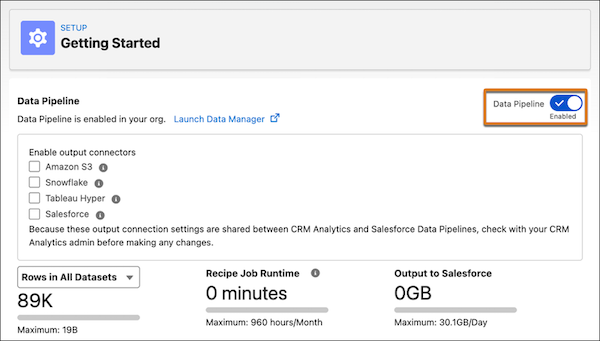
From Setup, in the Quick Find box, enter Data Pipeline,
and then select Getting Started. Turn on Data
Pipeline.
Click Launch Data Manager | Data Templates | Sales Planning. Then click Next.
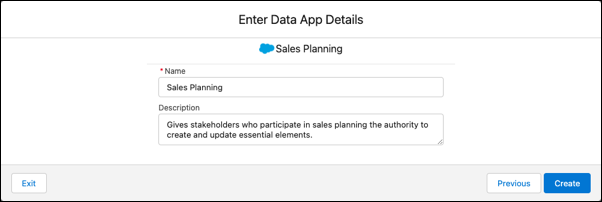
Enter the name Sales Planning and a description.
Click Create.
Data Pipelines creates an app that lets your stakeholders create and update
elements necessary for sales planning processes.
Important Do not modify the
default sharing setting for the Sales Planning app. Restricting access prevents users
from viewing data in Sales Planning and Territory Planning.
We use three kinds of cookies on our websites: required, functional, and advertising. You can choose whether functional and advertising cookies apply. Click on the different cookie categories to find out more about each category and to change the default settings.
Privacy Statement
Required Cookies
Always Active
Required cookies are necessary for basic website functionality. Some examples include: session cookies needed to transmit the website, authentication cookies, and security cookies.
Functional Cookies
Functional cookies enhance functions, performance, and services on the website. Some examples include: cookies used to analyze site traffic, cookies used for market research, and cookies used to display advertising that is not directed to a particular individual.
Advertising Cookies
Advertising cookies track activity across websites in order to understand a viewer’s interests, and direct them specific marketing. Some examples include: cookies used for remarketing, or interest-based advertising.