
You are here:
Create an Accumulated Variable for a Marginal Payout Function
Create an accumulated variable for the initial_value argument in the mamount() and mpercent() accelerator functions in Salesforce Spiff.
Required Editions
| Available in: both Salesforce Classic (not available in all orgs) and Lightning Experience |
| Available in: Enterprise, Unlimited, and Developer Editions |
| Available for an additional cost in: Professional Edition with Web Services API Enabled |
| User Permissions Needed | |
|---|---|
| To configure an accumulated variable in Spiff Designer: | A Spiff user role with this permission turned on. Designer Configuration: Manage |
-
In a datasheet, create a calculated field, Accumulated_ARR, and enter the variable that you want to accumulate, ARR__c.
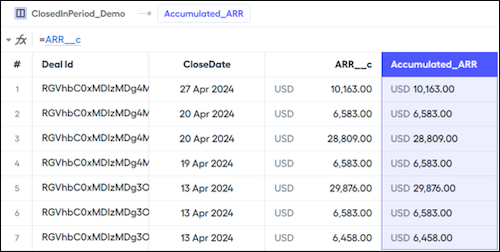
- In the right panel, open Accumulation and turn on Accumulated.
-
Optionally, select Accumulation Filter and Accumulation Sort options.
Accumulation Filter The data filter for the accumulated variable. Typically, this filter is the same data filter applied to the commission rule. For example, if the datasheet uses the ClosedInPeriod data filter, also use ClosedInPeriod for the accumulation filter. The ClosedInPeriod accumulation filter specifies that accumulation restarts at the beginning of each period. Accumulation Sort The value to sort accumulated records by. Sorting by CloseDate accumulates ARR in chronological order. To sort deals that close on the same day, select a different field, such as ID. 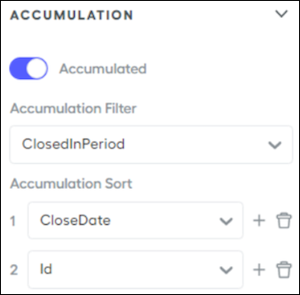
-
Save your changes.
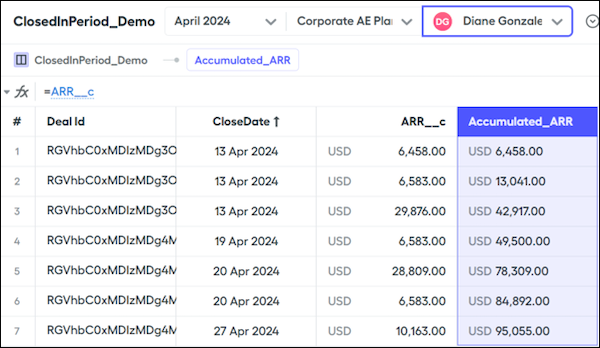
The The Accumulated_ARR field accumulates values throughout the period. The last value in chronological order is the sum of all of the ARR__c for the period.
-
Create another calculated field, Previous_ARR, that subtracts the current deal ARR from the accumulated ARR.
The Accumulated_ARR represents a running total of ARR after each deal is closed. But if you want to know a rep's ARR before a current deal closed, remove the value of the current deal from the accumulation.
=Accumulated_ARR - ARR__c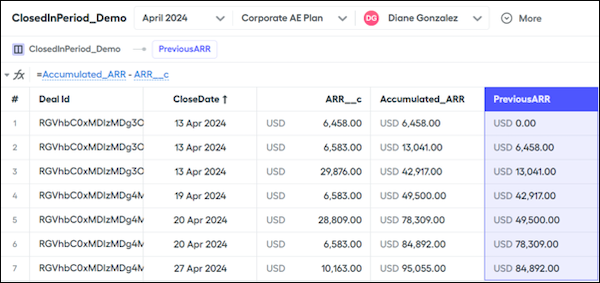
Use PreviousARR for the initial_value argument in the
mamount()andmpercent()functions.
Did this article solve your issue?
Let us know so we can improve!
