
You are here:
Considerations for Accelerator Functions in Salesforce Spiff
Salesforce Spiff provides several functions that support accelerators, including mamount(), mpercent(), range_lookup(), and tier_payout.
Required Editions
| Available in: both Salesforce Classic (not available in all orgs) and Lightning Experience |
| Available in: Enterprise, Unlimited, and Developer Editions |
| Available for an additional cost in: Professional Edition with Web Services API Enabled |
mamount() and mpercent()
Some companies commission on a marginal or tax bracket basis and commission revenue amounts at different rates. Let’s say that income is taxed at these rates.
- Income from $0 to $50,000 is taxed at a 5% rate
- Income from $50,000 to $100,000 is taxed at a 6% rate
- Income more than $100,000 is taxed at a 7% rate
If someone earns $102,000 in a year, only the amount within each range is taxed at that corresponding rate. The first $50,000 is taxed at 5%, the next $50,000 is taxed at 6%, and the remaining $2,000 is taxed at the 7% rate. If you calculate commissions similarly, use the mpercent() and mamount() functions.
These functions apply or return the right commission rate to the right amounts defined in a range table. Because of the accelerator functions' unique capabilities, create tables for the mpercent() and mamount() functions differently than tables used with the range_lookup() or tier_payout() functions.
For example, a rep closed $220,000 in sales this month. The mamount() function returns the appropriate commission amount based on the closed amount.
=mamount(220000, ExampleAcceleratorTable)The mamount() function performs this calculation, which results in $9,200 commission.
4% × 200,000 + 6% × 20,000 + 8% × 0 + 10% × 0The function looks up the amount in the range table and allocates the appropriate amount of each deal into the appropriate tier. Only the amount that falls into each tier is multiplied by the corresponding rate.
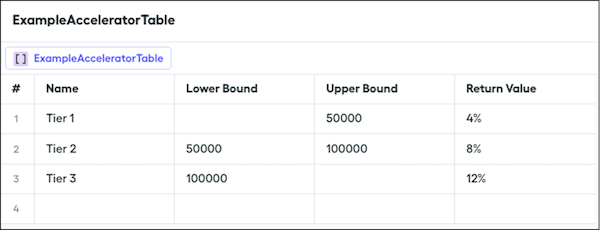
Rather than returning the commission amount earned, managers and reps often want to know the rate that’s applied to the commissionable amount. You can use the mpercent() function.
=mpercent(220000, ExampleAcceleratorTable)The mpercent() function performs this calculation, which results in 4.18% effective rate.
(4% × 200,000 + 6% × 20,000 + 8% × 0 + 10% × 0) ÷ 220,000tier_payout() and range_lookup()
Some companies have plan components where a single commission rate applies to all of the deals the rep closes. Typically, companies track the highest tier or rate the rep achieves and then award the higher rate to all sales within the time period.
Apply the tier_payout() function to the previous example where a rep closed $220,000 in sales this month.
=tier_payout(220000, ExampleAcceleratorTable)The tier_payout() function looks up the amount in the range table to find the matching range and then returns the associated rate, which in this case is 6%. In another calculation, you can multiply the 6% against $220,000 to get the commission owed to the rep. The range_lookup() function is functionally equivalent.
