
You are here:
Examples of Manual Accumulated Variables with the Let Function
Sometimes, an accumulated variable in Salesforce Spiff can't calculate an amount, so you must manually create accumulated variables by using the let() function.
Required Editions
| Available in: both Salesforce Classic (not available in all orgs) and Lightning Experience |
| Available in: Enterprise, Unlimited, and Developer Editions |
| Available for an additional cost in: Professional Edition with Web Services API Enabled |
A common reason why an accumulated variable doesn't calculate amount is when the period to sum varies for each record in the rule. For example, maybe a rule shows opportunities with payment dates within the period, and each opportunity has a close date in a different year, so calculating annual attainment with an accumulated variable isn't possible.
With the let() function, you can assign an alias to a field so that Spiff can compare dynamic values, such as each record’s close date, to a static value, such as a specific deal’s close date. For example, you can assign the alias ThisDealsCloseDate to a field that helps identify the field when you’re reading the logic.
Single Sort
In this example, the calculation sorts by CloseDate, summing deals that precede the current deal. The first deal, worth $4.357 million, is the total for deals closed from January through April, but doesn’t include May 1.
let(ThisDealsCloseDate, CloseDate,
sumif(ClosedInYearDataset, CloseDate < ThisDealsCloseDate, ARR))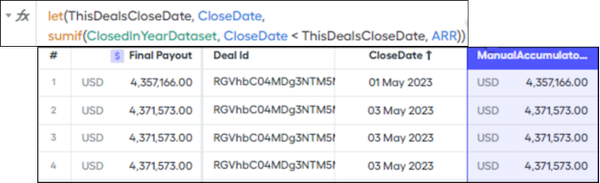
A secondary sort is almost always required. If multiple deals close on the same day, a manual accumulated variable returns the same value for each deal because they aren’t further sorted. You can introduce additional let() functions to sort by other criteria, such as DealID or DealValue, and ensure each deal is uniquely evaluated.
Secondary Sort
In the previous example, the primary sort is CloseDate. To expand this example and further differentiate deals closed on the same day, add a secondary sort by ID. The logic includes extra line breaks and indentations to identify each sort.
let(ThisDealsCloseDate, CloseDate,
let(ThisDealsId, Id,
sumif(ClosedInYearDataset,
    CloseDate < ThisDealsCloseDate OR
    (CloseDate = ThisDealsCloseDate AND Id > ThisDealsId)
, ARR)))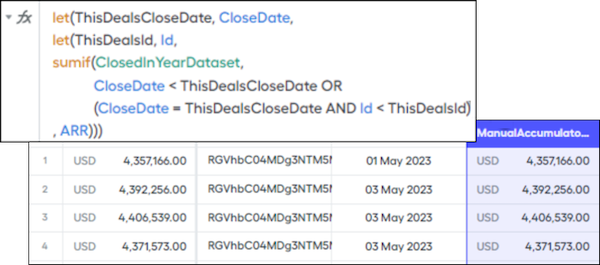
The accumulated values for rows 2 through 4 are now different. The increasing values for the day demonstrate the effectiveness of the secondary sort.
Lookback
Sorting criteria that covers multiple attainment periods is the most common use case for a manual accumulated variable. In this example, consider a rule that shows deals based on the payment date but the commission calculation is based on the closed date. The commission is based on annual attainment, so a manual accumulated variable is required if the opportunities calculated in the rule have close dates that span multiple years. If the opportunities all have the same close year, the accumulated variable is available because the opportunities all use the same data filter.
If not all deals can use the same data filter, you can use multiple accumulated variables for each data filter or a dynamic manual accumulation. Typically, a manual accumulated variable is recommended because it requires less maintenance. However, multiple accumulated variables are necessary if the let() function results in timeouts or memory issues.
Determine how far back you want to calculate. You can use a data filter with every deal closed, but if a shorter period is sufficient, use a smaller data filter. In this example, replace AllClosedOpportunitiesDataFilter with something like ClosedInPast24Months.
Adjust the sorts. This example calculates annual attainment, and the opportunities in the rule have close dates in 2022 and 2023. For deals closed in 2022, sum the 2022 opportunities up to the current deal, and for deals closed in 2023, sum the 2023 opportunities. The data filter covers a longer period, and the primary sort includes a start date.
let(ThisDealsCloseDate, CloseDate,
let(ThisDealsId, Id,
sumif(AllClosedOpportunitiesDataFilter,
    (CloseDate >= beginning_of_year(ThisDealsCloseDate) AND CloseDate < ThisDealsCloseDate) OR
    (CloseDate = ThisDealsCloseDate AND id < ThisDealsId)
, ARR__c)))
The single-sorted example covered the data filter only from the beginning of the year, so it didn't require a start date filter.
If an opportunity closed on August 15, 2022 with an Id of 123456abcd, the logic sums opportunities with these criteria.
- CloseDate >= 2022-01-01 (beginning_of_year(2022-08-15))
- CloseDate < 2022-08-15
- CloseDate = 2022-08-15 AND Id < 123456abcd
