Calculated Fields in Salesforce Spiff Data Filters
To use calculated fields in Salesforce Spiff data filters, the calculated field must be on the same object as the filter.
Required Editions
Available in: both Salesforce Classic (not available in all orgs) and Lightning
Experience
Available in: Enterprise, Unlimited, and Developer
Editions
Available for an additional cost in: Professional Edition with Web
Services API Enabled
When you create a data filter, you can reference any field that Spiff calculates on the same object. A calculated field can be derived from a variety of functions, and you can use standard data filter behaviors with the calculated field.
For example, maybe you have a commission plan where reps are eligible for payment only when their Split Annual Recurring Revenue (ARR) exceeds $20,000. Reps are compensated for only the percentage split of the deal. Even if a rep secures a deal worth $20,000 in ARR and the split percentage is 50%, the rep's eligible Split ARR is $10,000, below the required threshold.
To calculate the Split ARR accurately, create another calculated field, SplitArr.
=SplitPercent*ARR
One option is using a double filter to remove records that the rep isn't paid for. Or, skip the additional filtering step with a calculated field within the data filter.
ClosedInPeriod AND ByRep AND Split_Percent__c != null AND SplitARR >= 20000
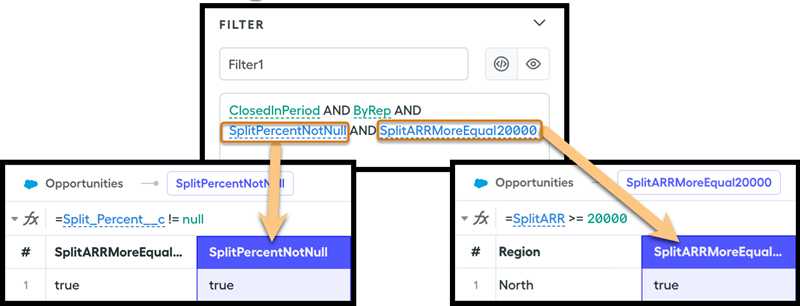
In addition, we recommend that you enclose these calculations in sub-data filters.
SplitPercentNotNull = Split_Percent__c != null
SplitARRMoreEqual20000 = SplitARR >= 20000

ClosedInPeriod AND ByRep AND SplitPercentNotNull AND SplitARRMoreEqual20000
Did this article solve your issue?
Let us know so we can improve!
Loading
Salesforce Help | Article
Cookie Consent Manager
General Information
Required Cookies
Functional Cookies
Advertising Cookies
General Information
We use three kinds of cookies on our websites: required, functional, and advertising. You can choose whether functional and advertising cookies apply. Click on the different cookie categories to find out more about each category and to change the default settings.
Privacy Statement
Required Cookies
Always Active
Required cookies are necessary for basic website functionality. Some examples include: session cookies needed to transmit the website, authentication cookies, and security cookies.
Functional Cookies
Functional cookies enhance functions, performance, and services on the website. Some examples include: cookies used to analyze site traffic, cookies used for market research, and cookies used to display advertising that is not directed to a particular individual.
Advertising Cookies
Advertising cookies track activity across websites in order to understand a viewer’s interests, and direct them specific marketing. Some examples include: cookies used for remarketing, or interest-based advertising.