Loading
Feature Disruption - Service Cloud VoiceRead More
Feature degradation | Gmail Email delivery failureRead More
Sales Performance Management
Table of Contents
Select Filters

          No results
          No results
          Here are some search tips

          Check the spelling of your keywords.
          Use more general search terms.
          Select fewer filters to broaden your search.

          Search all of Salesforce Help
          Data Filter Examples in Salesforce Spiff

          Data Filter Examples in Salesforce Spiff

          The possibilities for data filters in Salesforce Spiff are extensive, depending on the complexity and depth of your data. For best performance, get as specific as possible with a filter before you add a calculation. Simple Guided or Nested Guided mode can help you easily create simple, useful filters. With Nested Guided mode, combine prebuilt data filters together using AND or OR operators.
          Required Editions

          Available in: both Salesforce Classic (not available in all orgs) and Lightning Experience
          Available in: Enterprise, Unlimited, and Developer Editions
          Available for an additional cost in: Professional Edition with Web Services API Enabled

          ByRep

          Show all deals associated with a certain rep. This filter is available by default.

          OwnerId = rep.Id

          In Salesforce, the OwnerId field on the Opportunity object identifies the rep that closed a deal, but you can reference a different field.

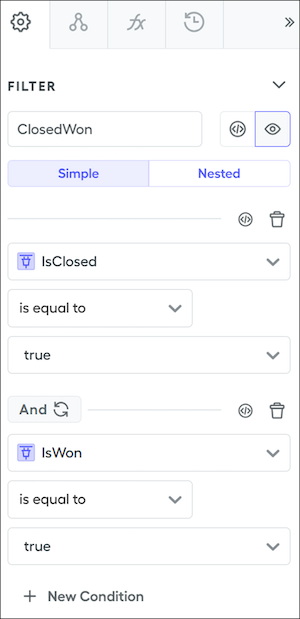
          ClosedWon

          Show all deals that are closed and won. This filter is available by default.

          (IsClosed=TRUE) AND (IsWon=TRUE)

          In Salesforce, the IsClosed and IsWon fields on the Opportunity object specify these statuses. This filter shows all deals for all reps and statement periods.

          Condition for ClosedWon filter in Simple Guided mode

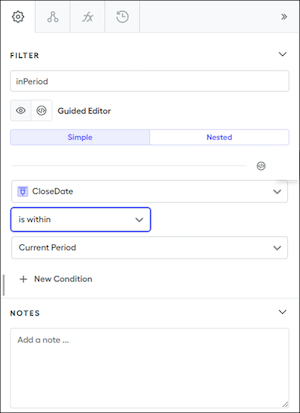
          InPeriod

          Show only deals with a close date in a specific period. This filter is available by default. For example, show deals that closed within the current month or deals that closed before the start of a statement period.

          date_between?(CloseDate, statement_period.start_date, end_of_period(statement_period.start_date))

          In Designer, create a filter on the Deals object and select these values.

          • CloseDate
          • isWithin
          • Current Period
          Condition for InPeriod filter in Simple Guided mode

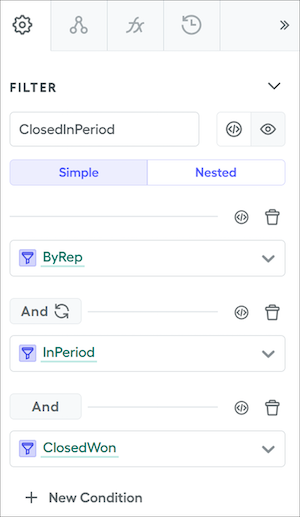
          ClosedInPeriod

          Show only deals that are closed and won by a specific rep within a specific statement period.

          ByRep AND InPeriod AND ClosedWon

          In Designer, create a filter on the Deals object and join the prebuilt ByRep, InPeriod, and ClosedWon filters with AND operators.

          Condition for ClosedInPeriod filter in Simple Guided mode
          Tip
          Tip When you enter the name of a filter that's already been created, the name changes color to indicate that Spiff recognizes the filter.

          By String Value

          When you're filtering string data types, enclose strings in quotes and pay close attention to spelling and capitalization.

          Find All Possible Field Values

          To return a list of all possible values for a field, create a data filter for the object that returns all types, then create a calculated field on the object.

          For example, to return all opportunity types, create this data filter.

          TypeNotNull = Type != null

          Then create this calculated field on the Opportunity object.

          UniqueTypeList = concat(transform_list(unique_by(TypeNotNull, Type), Type))
           
          Loading
          Salesforce Help | Article