
You are here:
Examples of Data Filters That Use Worksheet Calculations
With worksheet calculations in Salesforce Spiff data filters, dynamically update filtered data so you analyze, display, and interpret filters more efficiently.
Required Editions
| Available in: both Salesforce Classic (not available in all orgs) and Lightning Experience |
| Available in: Enterprise, Unlimited, and Developer Editions |
| Available for an additional cost in: Professional Edition with Web Services API Enabled |
Create a data filter with a worksheet calculation when both of these conditions are satisfied.
- You have a summary calculation that isn't tied directly to a connector field.
- Your data includes a Boolean field that's true for all rows, such as IsClosed, or a string field with a limited number of values, such as region or product names.
Example 1: Reps Aren't Paid on Upsells
In this example, there’s a mix of reps on the same plan where some reps are paid for upsell rows, but other reps aren't paid. A plan_assignment toggle indicates which reps get paid for upsells, but there's no direct connection to a connector field without performining some additional logic in a double filter.
Instead, create a worksheet calculation, IsUpsellCommissionable, that indicates whether the rep is paid on upsell rows.
=plan_assignment.UpsellCommissionable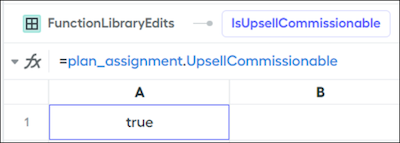
Create a data filter that compares the worksheet calculation output to fields that must always be true. Because the IsClosed field for every rep in this example must be true, use a summary calculation to compare those fields.
ByRep AND ClosedWon AND Worksheet1!IsUpsellCommissionable = IsClosed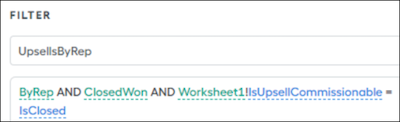
The summary calculation doesn’t take the place of the actual ClosedWon filter. For example, if you don’t want to pay the rep on upsells, IsUpsellCommissionable calculation returns false and matches rows where the IsClosed field is false. To get the right result, the ClosedWon filter must be separate from the IsUpsellCommissionable calculation.
Example 2: Reps in Different Groups Receive Commission on Different Products
In this example, reps belong to Group 1 or Group 2. Reps in each group receive commission on a different set of products.
Create a worksheet calculation, CommissionableProductList, that returns an array of the products that apply to each group. The default value is an empty array. Capture trace is turned off.
=ifs(RoleGroup = "Group 1",["Stuff", "Things", "Items"], RoleGroup = "Group 2",["Extra", "Other"], true, [])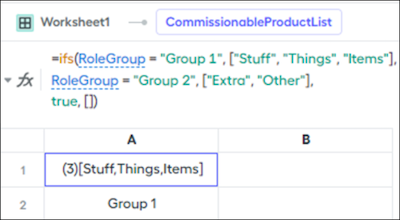
Create a data filter, ByItem, that uses the contains() function to compare strings from the worksheet calculation.
contains(Worksheet1!CommissionableProductList, Product__c)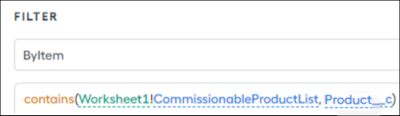
This solution dynamically returns the correct product rows in a single data filter, without using a double filter.
