
You are here:
Components of the Salesforce Spiff Commission Estimator
The Commission Estimator app includes a breakdown of the estimated commission according to Salesforce Spiff payout rules. The estimator also shows a bar graph of the quota attainment progress.
Required Editions
| Available in: both Salesforce Classic (not available in all orgs) and Lightning Experience |
| Available in: Enterprise, Unlimited, and Developer Editions |
| Available for an additional cost in: Professional Edition with Web Services API Enabled |
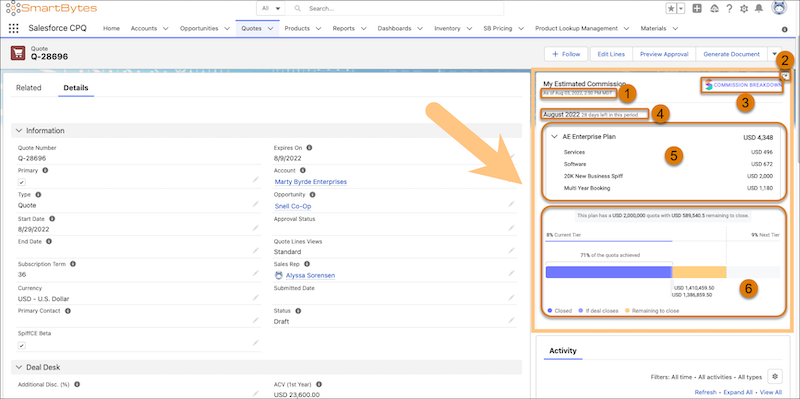
Time Stamp (1)
The time stamp shows the last time the estimate was updated. When you change the quote or opportunity, the time stamp is updated.
Refresh (2)
Trigger a manual refresh of the estimate. This option is available only if the Commission Estimator app is on the Quote or Opportunity record details page.
The estimate is refreshed automatically when you modify data from this record page or when you refresh the full record page.
Commission Breakdown (3)
Open the detailed Spiff commission statement for the current period, including all rules that also visible for the statement in Spiff.
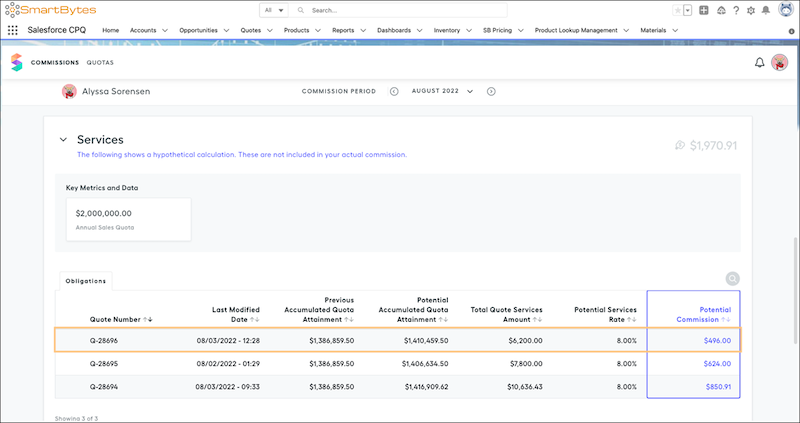
A hypothetical rule appears in the statement only if the Spiff admin turned on What-If? for the rule. If the admin turned on Ghost for the rule, the rule isn't visible in the commission estimate calculations. The fields that are available for each rule also depend on your admin's customizations.
You can generate on-the-fly commission estimates in Salesforce CPQ, but those quotes and opportunities aren’t automatically written to the Spiff database. All quote and opportunity records are visible to the rep in their Spiff statement only after they’re synced, either during the nightly sync or after a Spiff admin triggers a global resync manually.
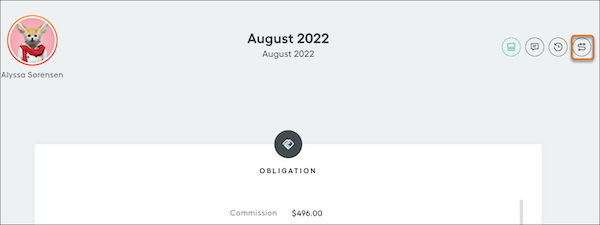
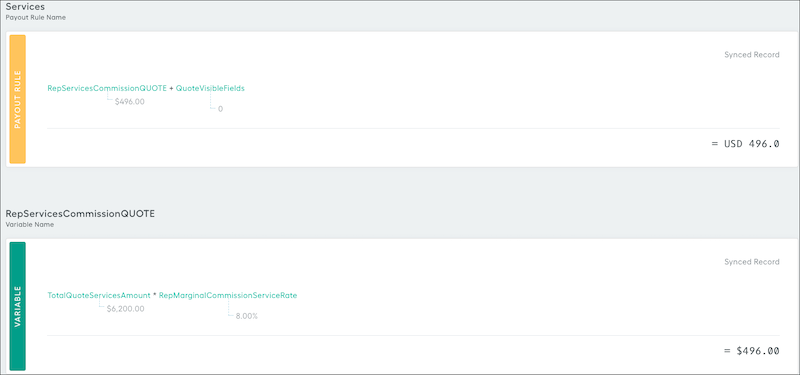
To trace a calculation and see how the commission was estimated, click a record.
Statement Period (4)
The statement period matches the current statement period in Spiff.
Payout Rule Breakdown (5)
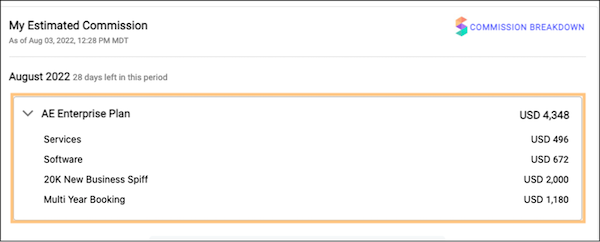
The plan total is the sum of payout rules that your admin enabled as Commission Estimator rules. Each hypothetical rule is built in Spiff, with logic that considers specific properties of the quote or opportunity.
For example, a quote with line items in the Services product family received a commission for Services. Similarly, the quote contained line items with the Software product family, so the appropriate commission for that category was calculated. In this example, commission was also awarded if the total ARR of the deal is more than $20,000 and if the deal was a multi-year booking.
Quota Attainment Graph (6)
The quota attainment graph is shown only if your admin has configured it.
The estimator supports one quota per plan. If you have multiple quota targets on multiple plans, your admin can select only one quota target to show in the graph.
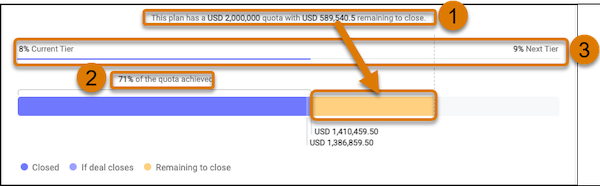
The graph shows this information.
- The rep's quota target and remaining amount (1). The remaining amount includes the amount of quota relief if the quoted deal closes.
- The percent progress of achieving the quota target (2).
- The percent progress toward achieving commission rate tiers (3). Sometimes there are different commission rates associated with each rule on a plan. For example, Services and Software can have different tiered rates. Your admin selects a rate to show in the graph.
