
You are here:
Configure Field Sets for the Salesforce Spiff Commission Estimator
The Quote, Quote Line, Opportunity, and Opportunity Product objects in Salesforce Spiff include several Salesforce fields as well as custom fields. To avoid errors later on, add all custom fields that are used in Spiff to field sets. Then, configure the field sets as source field sets for the Salesforce Spiff Commission Estimator.
Required Editions
| Available in: both Salesforce Classic (not available in all orgs) and Lightning Experience |
| Available in: Enterprise, Unlimited, and Developer Editions |
| Available for an additional cost in: Professional Edition with Web Services API Enabled |
| User Permissions Needed | |
|---|---|
| To view Spiff synced objects and fields: | A Spiff user role with this permission turned on. Connectors: Edit |
| To edit Salesforce object field sets: | (Salesforce) Customize Application |
| To edit Salesforce custom settings: | (Salesforce) Customize Application |
The only fields that you need to add to field sets are custom fields required for calculating commission on a quote or opportunity. You don't need to add standard fields to field sets, because Spiff already considers these fields.
Retrieve a List of All Required Fields in Spiff
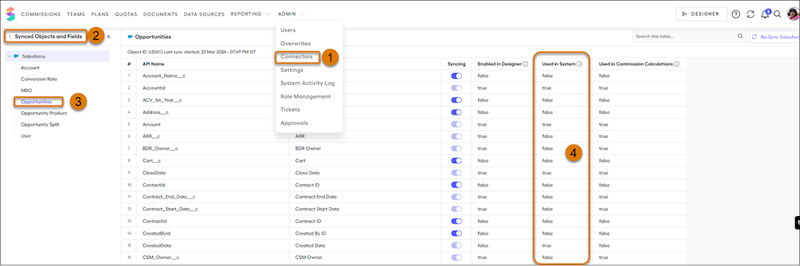
- From the Admin menu, select Connectors (1).
- Select Synced Objects and Fields (2).
-
Select the Quote, Quote Line, Opportunity, or Opportunity Product object (3), and check the Used in System column (4).
If the Used in System column is true, the field is used in Spiff. Make a list of the fields that are used.
- Repeat the previous step for other objects.
Create Field Sets
- Log in to Salesforce as an admin.
-
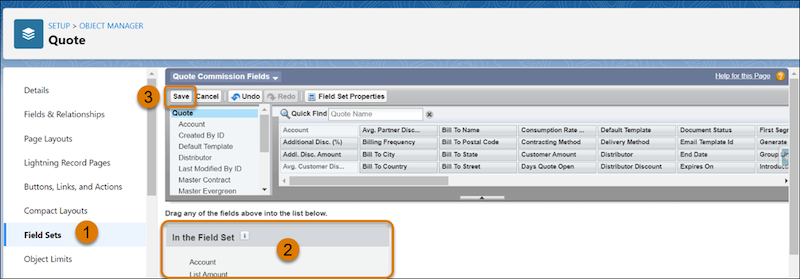
From the Object Manager in Setup, select the Quote (
SBQQ__Quote__c), Quote Line (SBQQ__QuoteLine__c), Opportunity, or Opportunity Product object. - Select Field Sets (1).
-
Click New and enter these details for the object.
- For a Quote, specify a Field Set Label of Spiff Quote Commission Fields and Field Set Name of Spiff_Quote_Commission_Fields.
- For a Quote Line, specify a Field Set Label of Spiff QuoteLine Commission Fields and Field Set Name of Spiff_QuoteLine_Commission_Fields.
- For an Opportunity, specify a Field Set Label of Spiff Opportunity Commission Fields and Field Set Name of Spiff_Opportunity_Commission_Fields.
- For an Opportunity Product, specify a Field Set Label of Spiff Opportunity Line Commission Fields and Field Set Name of Spiff_Opportunity_Line_Commission_Fields.
- Drag the custom fields you identified for the object into the field set (2), and save your changes (3).
- Repeat these steps for the other objects.
Configure Field Sets as Source Field Sets
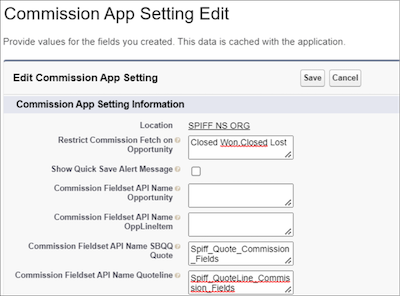
- From Setup, in the Quick Find box, enter Custom Settings, and then select Custom Settings.
- For Commission App Settings, click Manage.
-
Click Edit and enter these values.
Commission Fieldset API Name SBQQ Quote The API name of the Quote field set you created, Spiff_Quote_Commission_Fields Commission Fieldset API Name Quoteline The API name of the Quote Line field set you created, Spiff_QuoteLine_Commission_Fields Commission Fieldset API Name Opportunity The API name of the Opportunity field set you created, Spiff_Opportunity_Commission_Fields Commission Fieldset API Name OppLineItem The API name of the Opportunity Product field set you created, Spiff_Opportunity_Line_Commission_Fields - Save your changes.
See Also
Did this article solve your issue?
Let us know so we can improve!
