
You are here:
Field Requirements for the Quota Attainment Graph
To show data in the quota attainment bar graph with the Salesforce Spiff Commission Estimator, set up required fields, even if the fields don't have any values.
Required Editions
| Available in: both Salesforce Classic (not available in all orgs) and Lightning Experience |
| Available in: Enterprise, Unlimited, and Developer Editions |
| Available for an additional cost in: Professional Edition with Web Services API Enabled |
Datasheet Formulas
In the datasheet used with the quota attainment graph, add an sce_fields column that uses this formula.
=if(WorksheetName!sce_amount,0,0) + if(sce_current_tier_percent,0,0) + if(sce_next_tier_percent,0,0) + if(sce_attainment_if_deal_closes,0,0) + if(sce_year_to_date_attainment,0,0) + if(sce_remaining_attainment_amount,0,0)Configure the final payout value column to use this formula.
=if(sce_fields = null,0,0)These formulas ensure that the graph shows data for its required fields.
Fields
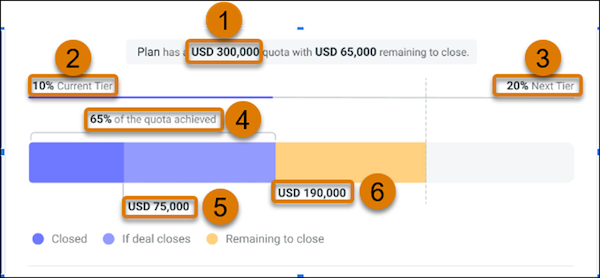

Important Match the field names exactly, all lowercase.
| Field API Name | Description |
|---|---|
sce_amount (1) |
Worksheet calculation that returns the quota amount for the rep. If the rep has multiple quotas, select the quota you want to use for the attainment graph. Make sure that the quota period matches the sce_year_to_date_attainment field's calculation. |
sce_current_tier_percent (2) |
Datasheet calculation that returns the commission rate tier based on the current year-to-date attainment for the quota's primary component. For example, return the percentage the rep is paid when they close a deal at the time that the estimate is requested. We recommend that you exclude the current deal being estimated. |
sce_next_tier_percent (3) |
Datasheet calculation that returns the expected commission rate from the next tier in the rate table. For example, return the next percentage payout for the rep in a multi-tier commission plan. If the rep has already achieved the maximum commission rate, this value matches sce_current_tier_percent. |
sce_attainment_if_deal_closes (4) |
Datasheet calculation that returns the rep's quota total attainment amount if the quote closes at the time of the requested estimate. This value is sce_year_to_date_attainment plus the attainment amount that's added to the current attainment if the quote deal closes. |
sce_year_to_date_attainment (5) |
Datasheet calculation that returns the current opportunity or deal-based attainment amount for the rep. |
sce_remaining_attainment_amount (6) |
Datasheet calculation that returns the remaining amount needed to fulfill the quota, sce_amount - sce_attainment_if_deal_closes. |
Did this article solve your issue?
Let us know so we can improve!
