
You are here:
Commission Expense Reports in Salesforce Spiff
Help your finance teams efficiently generate commission expense reports for the incremental costs that sales reps incur for closing deals with customers, such the costs of obtaining contracts. Use Salesforce Spiff data to automate commission expense reports that are compliant with Accounting Standards Codification (ASC) 606 and International Financial Reporting Standard (IFRS) 15 accounting standards.
Required Editions
| Available in: both Salesforce Classic (not available in all orgs) and Lightning Experience |
| Available in: Enterprise, Unlimited, and Developer Editions |
| Available for an additional cost in: Professional Edition with Web Services API Enabled |
To expense these costs, commissions are capitalized and amortized consistent with the transfer of the goods or services.
Portfolios
Portfolios in Spiff track and expense commission amounts. You can configure portfolios for these activities.
- Capture and expense fringe benefits
- Expense immediately
- Amortize expenses over a specific number of months or dynamic time period
Choose between these straight-line methods for amortizing expenses.
- By even periods, where the portfolio divides the expense from the purchase amount evenly across all periods, even partial periods. Amounts aren't prorated. Any value under $0.01 is rounded up or down to the closest cent.
- By exact days, where the portfolio amortizes amounts individually for each period, based on the number of days in that period. Because each period can have a different number of days, each period can have a different amount. Any value under $0.01 is rounded up or down to the closest cent. All monthly rounded amounts are summed and added to the final expense of the amortization schedule.
For example, if the amortization of a $1,000 commission starts March 15 and ends July 14, the full amortization period is 122 days.
| Period | Straight-Line, By Even Periods | Straight-Line, Using Exact Days | |
|---|---|---|---|
| Expense | Days | Expense | |
| March | $200.00 | 17 | $139.34 |
| April | $200.00 | 30 | $245.90 |
| May | $200 | 31 | $254.10 |
| June | $200 | 30 | $245.90 |
| July | $200 | 14 | $114.75 |
Commission Expensing Report
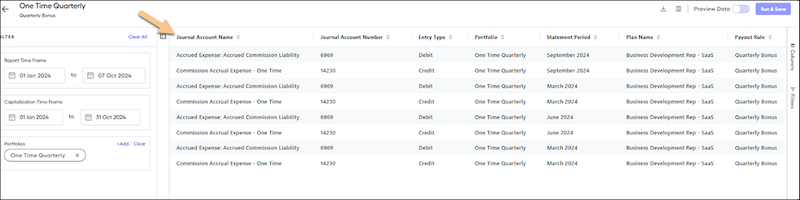
The Commission Expensing report shows the details about the portfolio and the rules for commissions to expense, such as accounts, account numbers, and lines for debits and credits.
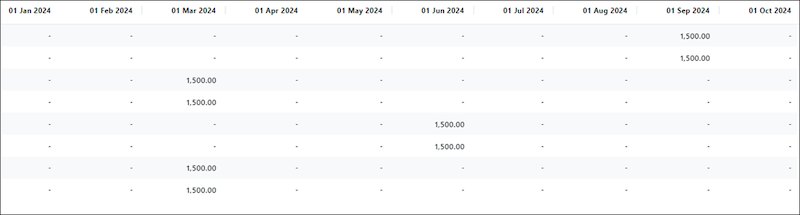
Scroll horizontally to see the periods captured in the report and view the commission amounts in each appropriate period.
- Set Up a Commission Expense Report in Salesforce Spiff
To create a commission expense report, set up general ledger accounts, establish fringe benefit rules, and create a commission expense portfolio. - Special Commission Expense Cases in Salesforce Spiff
Some commission expense scenarios in Salesforce Spiff require some creativity and workarounds. - Set Up a Historical Commission Expense Report
If your company has historical sales data from a system outside of Salesforce Spiff, you can include that data in a commission expense report.
