
You are here:
filter
Further filters records in a Salesforce Spiff data filter, list, or relationship and returns a list of records that match a specified condition. This function helps refine an existing data filter.
Required Editions
| Available in: both Salesforce Classic (not available in all orgs) and Lightning Experience |
| Available in: Enterprise, Unlimited, and Developer Editions |
| Available for an additional cost in: Professional Edition with Web Services API Enabled |
Syntax
filter(scope_or_list, condition)Arguments
| Argument | Required? | Description |
|---|---|---|
| scope_or_list | Required | The data filter, list that another function returns, or relationship that you want to further filter. |
| condition | Required | An expression that specifies the condition that you want to filter records for. |
Example with Data Filter
We recommend that use the filter() function to further refine data from a standard data filter. For example, the default ClosedInPeriod data filter specifies these conditions.
ByRep AND InPeriod AND ClosedWonYou can modify this default filter to include only deals where ARR exceeds $10,000.
ByRep AND InPeriod AND ClosedWon AND ARR > 10000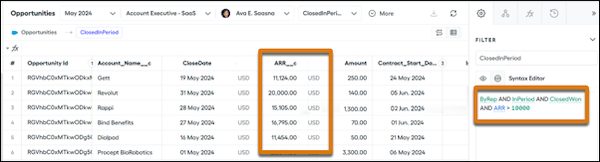
Modifying a data filter helps you see more of the filtered data at once.
You can apply the same condition with the filter() function.
=filter(ClosedInPeriod, ARR > 10000)However, this function returns a list, which is a single item and Spiff can't show a deal-by-deal breakdown of the list in the data view of your rule. Combine this function with other functions such as choose(), single(), and transform_list() to return specific list items.
Example with Relationship
Use the filter() function with one-to-many relationships where multiple related records are returned. For example, commission rules depend on specific line items related to an opportunity. The filter() function can filter the OppToOppProduct relationship to return multiple line items from the Opportunity Product object. Filter the line items so you return only the items where the value of the ARR__c field isn't null and greater than $1,000.
=filter(OppToOppProduct, ARR__c != null AND ARR__c > 1000)To return only the ARR__c field from the filter, enclose the formula with the transform_list() function.
=transform_list(filter(OppToOppProduct, ARR__c != null AND ARR__c > 1000), ARR__c)