
You are here:
month
Returns the number of the calendar month for a specified date or time in Salesforce Spiff.
Required Editions
| Available in: both Salesforce Classic (not available in all orgs) and Lightning Experience |
| Available in: Enterprise, Unlimited, and Developer Editions |
| Available for an additional cost in: Professional Edition with Web Services API Enabled |
Syntax
month(date_or_time)Arguments
| Argument | Required? | Description |
|---|---|---|
| date_or_time | Required | The Date or Date & Time value to evaluate. This argument supports any date functions. |
Example
Return the number of the calendar month for July 21, 2024. The return value is 7.
=month("2024-07-21")Return the number of the calendar day based on CloseDate.
=month(CloseDate)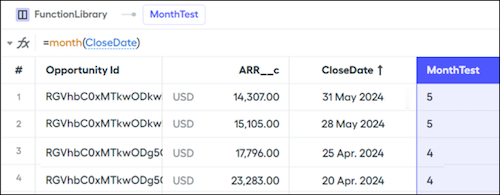
In another example, maybe you want to create a statement calculation that returns true if the period is an even month.
=month(statement_period.start_date) = 2 OR
month(statement_period.start_date) = 4 OR
month(statement_period.start_date) = 6 OR
month(statement_period.start_date) = 8 OR
month(statement_period.start_date) = 10 OR
month(statement_period.start_date) = 12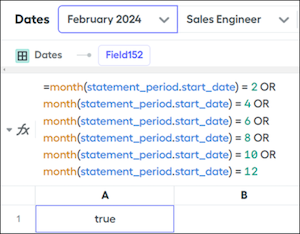
To simplify this formula, add the mod() function, which determines whether the result of the month() function is divisible by 2.
=mod(month(statement_period.start_date), 2) = 0Did this article solve your issue?
Let us know so we can improve!
