Compares a list of filtered numbers that represent rep metrics in Salesforce Spiff, such as monthly attainment, and returns a ranking relative to the rest of the list. This function doesn't break ties and awards the same ranking to all numbers that tie.
Required Editions
Available in: both Salesforce Classic (not available in all orgs) and Lightning
Experience
Available in: Enterprise, Unlimited, and Developer
Editions
Available for an additional cost in: Professional Edition with Web
Services API Enabled
Syntax
rank(target, filter, rank_by)
Arguments
Argument
Required?
Description
target
Required
The field or object that you want to rank.
filter
Required
A data filter that specifies the data that you want to use for ranking.
rank_by
Required
The criteria for sorting and ranking the filtered data.
Example
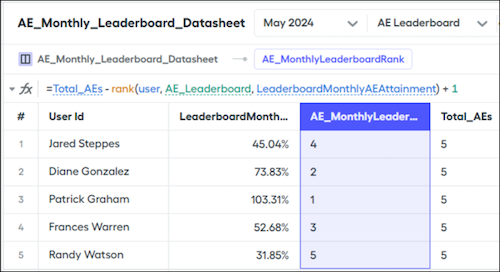
Create a rollup data filter named AE_Leaderboard, based on the User object, that returns the users from different AE teams. Rank users in this data filter by the output of the LeaderboardMonthlyAttainment calculation.
By default, this function's return ranking sorts data from lowest to highest. If you sort five users by monthly attainment, the rep with the highest attainment is ranked fifth.
To invert the ranking results so that the rep with highest attainment is ranked first, use the output of the rank() function in another formula. If you're sorting five users, maybe you have another calculation, Total_AEs, that counts the number of users, subtracts the rank, and adds 1.
We use three kinds of cookies on our websites: required, functional, and advertising. You can choose whether functional and advertising cookies apply. Click on the different cookie categories to find out more about each category and to change the default settings.
Privacy Statement
Required Cookies
Always Active
Required cookies are necessary for basic website functionality. Some examples include: session cookies needed to transmit the website, authentication cookies, and security cookies.
Functional Cookies
Functional cookies enhance functions, performance, and services on the website. Some examples include: cookies used to analyze site traffic, cookies used for market research, and cookies used to display advertising that is not directed to a particular individual.
Advertising Cookies
Advertising cookies track activity across websites in order to understand a viewer’s interests, and direct them specific marketing. Some examples include: cookies used for remarketing, or interest-based advertising.