
You are here:
tier_payout
Returns a payout amount from within an upper and lower range of values in Salesforce Spiff, based on a range table. This function returns the specified column expression for that value.
Required Editions
| Available in: both Salesforce Classic (not available in all orgs) and Lightning Experience |
| Available in: Enterprise, Unlimited, and Developer Editions |
| Available for an additional cost in: Professional Edition with Web Services API Enabled |
Syntax
tier_payout(lookup_value, table, tiebreak_below, return_column)Arguments
| Argument | Required? | Description |
|---|---|---|
| lookup_value | Required | The value to look up in the range table. |
| table | Required | The range table to look up the value in. |
| tiebreak_below | Optional | An expression that specifies how the function handles a lookup_value that exists in multiple tiers. If you don't specify this argument, this function uses the tier with the lower value. |
| return_column | Optional | The name of the range table's specific return column, enclosed in double quotes. This argument is required only if the range table includes multiple return columns, which is helpful when the same value ranges are used across multiple plans with different rates. |
Considerations
You can use previously created summary calculations and mathematical operations in a range table. Reference these calculations with the syntax WorksheetName!CalculationName.
Examples
A rep's attainment is 71.89%, which falls into an accelerator table's Tier 2, which pays 100%.
=tier_payout(RepAttainment, AcceleratorTable, false, "Accelerator")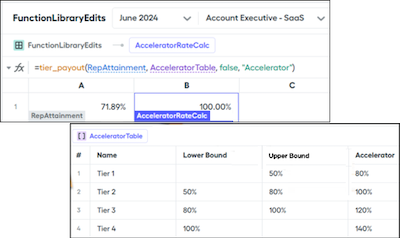
Did this article solve your issue?
Let us know so we can improve!
