
You are here:
vlookup
References a value from a lookup table in Salesforce Spiff and returns the specified column expression for that value.
Required Editions
| Available in: both Salesforce Classic (not available in all orgs) and Lightning Experience |
| Available in: Enterprise, Unlimited, and Developer Editions |
| Available for an additional cost in: Professional Edition with Web Services API Enabled |
Syntax
vlookup(lookup_value, table, return_column, exact_match, default_value)Arguments
| Argument | Required? | Description |
|---|---|---|
| lookup_value | Required | The value to look up. You can also use a formula that results in a value. |
| table | Required | The name of the lookup table. |
| return_column | Optional | The name of the lookup table's specific return column, enclosed in double quotes. This argument is required only if the lookup table includes multiple return columns. |
| exact_match | Optional | A Boolean that specifies whether you want to look up an exact match for lookup_value.
|
| default_value | Optional | A value to return when the function can't find a match for lookup_value in the lookup table. |
Example
Return the commission rate from the PayoutRates table for a BDR.
=vlookup("BDR", PayoutRates, "Rate", true, 0)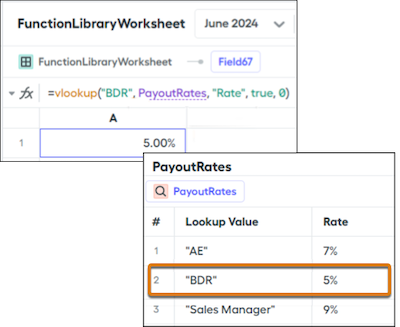
Did this article solve your issue?
Let us know so we can improve!
