
You are here:
Functions in Salesforce Spiff
Salesforce Spiff Designer provides a library of functions for calculating values and handling different data types.
Required Editions
| Available in: both Salesforce Classic (not available in all orgs) and Lightning Experience |
| Available in: Enterprise, Unlimited, and Developer Editions |
| Available for an additional cost in: Professional Edition with Web Services API Enabled |
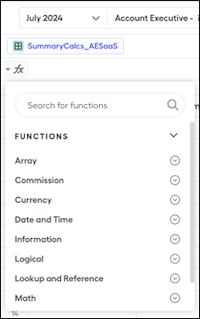
Access the function library from the top middle panel in Designer by clicking the functions icon in the formula bar.
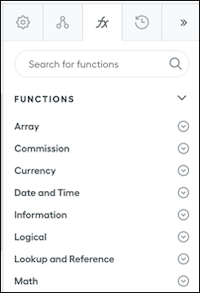
When you select a datasheet, worksheet, table, or filter in Designer, the right panel shows the functions tab.
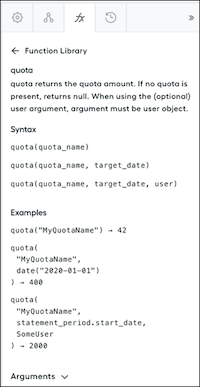
Selecting a function shows its description, syntax, examples, and arguments.
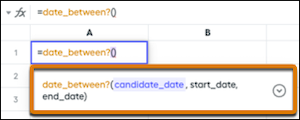
When you enter the name of a function in the formula bar, the function name turns yellow if the function is recognized and a tooltip shows the expected syntax and arguments. To show more details about the function without searching for it, click the dropdown menu. Selecting the function in the formula bar opens the function library in the right panel.

- Year, Quarter, or Month Functions
Functions for the beginning and end of a year, quarter, or month in Salesforce Spiff help you compare data during the specified time period. Combine these functions with other functions that process dates. - Team and User Objects in Salesforce Spiff Functions
Reference teams and teams in some Salesforce Spiff functions. - Null and Zero in Salesforce Spiff Functions
Some functions in Salesforce Spiff divide by zero, return null, or accept null as an argument. - Selecting One Item or Record from a List or Array in Salesforce Spiff
Functions in Salesforce Spiff commission logic often require that you reference one item or record in a list or array, such as the first invoice, latest payment record, or current user. Sometimes you must make sure that you select an item even when the list or filter contains only one item. - Dot Syntax in Salesforce Spiff Formulas
Functions and formulas in Salesforce Spiff use dot syntax for efficiently referencing fields, relationships, Team object details, and data from multiple records. - Salesforce Spiff Function Reference
Each function in Salesforce Spiff requires specific syntax and arguments. - Helper Functions in Salesforce Spiff
Helper functions in Salesforce Spiff save time and provide clarity. A helper function is interchangeable with a standard function, but uses simpler syntax so you can create logic more easily.
