
You are here:
Year, Quarter, or Month Functions
Functions for the beginning and end of a year, quarter, or month in Salesforce Spiff help you compare data during the specified time period. Combine these functions with other functions that process dates.
Required Editions
| Available in: both Salesforce Classic (not available in all orgs) and Lightning Experience |
| Available in: Enterprise, Unlimited, and Developer Editions |
| Available for an additional cost in: Professional Edition with Web Services API Enabled |
Find the Beginning of Time Period
To find the beginning of the year relative to the statement period, use the statement period start or end date for the beginning_of_year() function's input. This calculation changes dynamically in each period and returns the beginning of year date associated with the statement period start date.
=beginning_of_year(statement_period.start_date)For February 2024 or November 2024, this function returns January 1, 2024. For December 2023, this function returns January 1, 2023.
Here are a few other examples.
| Date to Find | Formula |
|---|---|
| Beginning of the previous month | =months_ago(statement_period.start_date, 1) |
| Beginning of the previous quarter | =beginning_of_quarter(days_ago(beginning_of_quarter(statement_period.start_date), 1)) |
| Beginning of the previous statement period |
This example requires a separate EndOfLastStatementPeriod calculation. |
| Beginning of the previous year | =beginning_of_year(days_ago(beginning_of_year(statement_period.start_date), 1)) |
| Beginning of Q1 in the previous year |
This example requires a separate BeginningOfQ1 calculation. |
| Beginning of Q2 in the current year |
This example requires a separate EndOfQ1 calculation. |
| Beginning of the current quarter | =beginning_of_quarter(statement_period.start_date) |
| Beginning of two monthly statement periods ago | =months_ago(statement_period.start_date, 2) |
Find the End of Time Period
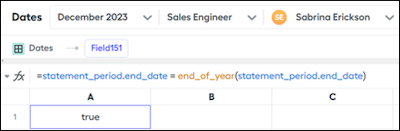
Test that a function works as expected for a specific time period. For example, let's say you have this formula.
=statement_period.end_date = end_of_year(statement_period.end_date)If the statement period is December, this formula returns true. For all periods, this formula returns false.
And end function can help you pay out only at certain times, which is especially useful if a rep receives an annual bonus. Wrap the calculation in an if statement that returns a 1 if true or a 0 if false. Then multiply by another calculation, and make sure that 0 is returned if the day isn’t the end of the month, quarter, or year.
=if(IsEndOfQuarter, 1, 0) * QuarterlyCommissionHere are a few other examples.
| Date to Find | Formula |
|---|---|
| End of the previous month | =days_ago(statement_period.start_date, 1) |
| End of the previous quarter | =days_ago(beginning_of_quarter(statement_period.start_date), 1) |
| End of the previous statement period | =days_ago(statement_period.start_date, 1) |
| End of the previous year | =days_ago(beginning_of_year(statement_period.start_date), 1) |
| End of Q1 in the current year | =end_of_quarter(beginning_of_year(statement_period.start_date)) |
| End of Q1 in the previous year |
This example requires a separate EndOfQ1 calculation. |
| End of Q2 in the current year |
This example requires a separate BeginningOfQ2 calculation. |
| End of the current quarter | =end_of_quarter(statement_period.start_date) |
| End of two monthly statement periods ago |
This example requires a separate BeginningOfLastMonth calculation. |
Calculate Half of a Year
Create these worksheet calculations.
BeginYear = beginning_of_year(statement_period.start_date)MidYear = months_ago(BeginYear, -6)EndYear = end_of_year(statement_period.start_date)Then, create these worksheet calculations that determine whether a date falls into the first or second half of the year.
HalfYearStart = if(statement_period.start_date < MidYear, BeginYear, MidYear)HalfYearEnd = if(statement_period.start_date > MidYear, days_ago(MidYear, 1), EndYear)Finally, create a data filter.
=date_between?(CloseDate, HalfYearStart, HalfYearEnd)Manage Fiscal Years
To switch to a new fiscal period without having to change other values, use the beginning_of_year() and beginning_of_fiscal_year() functions in filters to pivot after a specific date. For example, consider this definition of the InYear filter with these requirements.
- Calendar year 2021 or prior
- A 13-month year from January 1, 2022 to January 31, 2023
- A 12-month fiscal year that begins February 1, 2023
(CloseDate <= statement_period.end_date)
            AND
            (
            ((CloseDate >= beginning_of_year(statement_period.start_date)) AND (CloseDate <= date("2021-12-31")))
            OR
            ((CloseDate >= beginning_of_fiscal_year(statement_period.start_date)) AND (CloseDate >= date("2023-02-01")))
            OR
            ((CloseDate >= date("2022-01-01" ))  AND (CloseDate < date("2023-02-01" )))
            )
Compare Date and Date & Time Values
Some fields in Spiff use only Date values but other fields have Date & Time values. You can't compare these values directly unless you convert one type to another. The beginning_of_day() and end_of_day() functions help convert Date values to Date & Time values. For example, find the Date & Time value of the EndOfPeriod date.
=end_of_day(EndOfPeriod)