
You are here:
Plan Management in Salesforce Spiff
Align the interests of sales reps with the goals of the organization using commission plans. Plans are vital components of a company’s compensation strategy that outline the structure, parameters, and criteria for calculating commissions based on sales performance.
Required Editions
| Available in: both Salesforce Classic (not available in all orgs) and Lightning Experience |
| Available in: Enterprise, Unlimited, and Developer Editions |
| Available for an additional cost in: Professional Edition with Web Services API Enabled |
The Plans tab in Designer provides a comprehensive overview of all created entities, including plans, worksheets, datasheets, tables, and folders. Access plans from a centralized location to manage essential system elements with the flexibility to structure and organize your plans according to your preferences. For example, you can create folders for specific components within a plan and place all relevant elements in their respective component folders.
The left panel provides the functionality to create top-level folders and elements, enabling you to manage elements that aren’t directly associated with a specific plan. This feature allows you to create folders for various purposes, such as organize plans, manage rules, or store commonly used calculations within a worksheet or datasheet. Additionally, you can create and maintain quota tables, lookup tables, and range tables that are used across multiple plans, ensuring consistency and efficiency in your commission management. This level of flexibility lets you establish a structured and customized environment that suits your specific needs and streamlines your workflow.
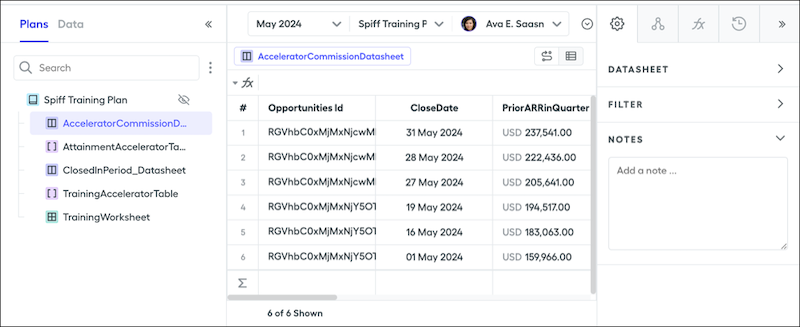
When working in worksheets, datasheets, lookup tables, and range tables, you have access to a comprehensive panel on the right side of the interface. This panel consists of three to four tabs, each offering a wealth of valuable information related to the rule or calculation you’re working on. The options in the right panel vary depending on the specific element you’re working with.
Building a commission plan typically includes these activities.
- Syncing in data and connecting the fields needed for data filters, calculations, rules, and reports.
- Creating the plan and assigning users.
- Creating any data filters that filter all the records in an object including records you pay commission on for a particular rule or plan component.
- Creating any worksheets, datasheets, quota tables, range tables, or lookup tables to use for the calculations in your payout rules.
- Creating a payout rule that calculates commission line-by-line or as a lump sum.
- Calculating statements for the reps assigned to the plan.
- Customizing the statement design by personalizing the fields and metrics that are visible on the statement for that rule.
Create Data Points in Custom Plan Fields
With custom plan fields, you can create a unique data point for each plan. Use a formula that references the custom plan field across multiple plans.
- Use custom plan fields only for values that never change.
- Use plan assignment custom fields so each rep has a unique value attached to their plan assignment that can use effective dates.
- Use range and lookup tables for custom values between plans.
- Plan Assignment External IDs in Salesforce Spiff
In Salesforce Spiff, the external ID field on a plan assignment supports bulk uploading and updating of plan assignments with Mass Data Management. - Create a Plan in Salesforce Spiff
Motivate and reward sales reps for their achievements and contributions when you create commission plans. - Assign Users to a Plan in Salesforce Spiff
Help drive sales performance and business growth when you identify which sales reps and managers are covered under the commission plan. - Handle Plan Changes Through Effective Dates for Users
Control when users start and stop getting statements for a plan by adding effective dates. Statements are generated indefinitely if no effective dates are added. Keep up with plan changes by updating Effective Until dates when needed. Remove a user from a plan by adding an Effective Until date. - Remove Users from a Plan in Salesforce Spiff
In general, we strongly advise that you never remove a user from a plan. Especially if the user has at one point had a statement calculated for them. Often users remove reps from a plan thinking that if the statement is frozen, it’s preserved. Removing a user from a plan results in losing historical commission statements, even if they’ve been frozen. Rather than removing a rep from a plan, it’s suggested you instead use an Effective Until date to stop the generation of commission statements beyond the specified date - Archive a Plan in Salesforce Spiff
Keep the Plans page and Designer up to date and clutter-free when you archive past plans. Commission plans are often rebuilt at least one time a year, causing old versions of plans to pile up. Archiving plans hides them from view, but they’re still easily accessible. - Hidden Plans in Salesforce Spiff
In Salesforce Spiff, create plans that are visible only to certain users so that you can generate reports, experiment with new rules, perform mid-year changes, or prepare plans in advance. - Options for Dynamic Data in Salesforce Spiff Plans
In Salesforce Spiff, manage plans more efficiently by making some fields dynamic instead of static. To help you choose the best options, review pros and cons. - Assign Territories to Reps with Plan Assignments
If your sales reps are responsible for specific regions or territories, manage those responsibilities as part of plan assignments in Salesforce Spiff. Create a custom field that you reference in region data filter.
