
You are here:
Create a Manager Rollup Filter for Opportunity Splits
Opportunity splits occur when two or more people contribute to a deal and the commission is divided among the contributors. In Salesforce Spiff, help managers view opportunity splits with a manager rollup filter.
Required Editions
| Available in: both Salesforce Classic (not available in all orgs) and Lightning Experience |
| Available in: Enterprise, Unlimited, and Developer Editions |
| Available for an additional cost in: Professional Edition with Web Services API Enabled |
| User Permissions Needed | |
|---|---|
| To create a rollup filter: | A Spiff user role with this permission turned on. Designer Configuration: Manage |
- Create a relationship from Opportunity Product to Opportunity Split.
-
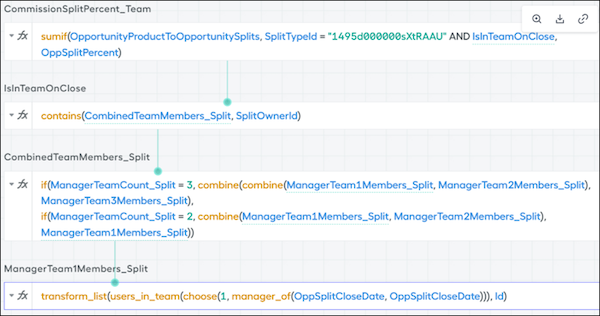
On Opportunity Product, create a calculated field, named CommissionSplitPercentTeam, that uses this formula.
=sumif(OpportunityProductToOpportunitySplits, SplitTypeId = "18-digit ID" AND IsInTeamOnClose, OppSplitPercent) Tip We recommend that you turn off trace at this level.
 -
On Opportunity Split, create a calculated field, named IsInTeamOnClose, that uses this formula.
=contains(CombinedTeamMembers_Split, SplitOwnerId) -
On Opportunity Split, create another calculated field, named CombinedTeamMembers_Split, that uses this formula.
if(ManagerTeamCount_Split = 3, combine(combine(ManagerTeam1Members_Split, ManagerTeam2Members_Split),ManagerTeam3Members_Split), if(ManagerTeamCount_Split = 2, combine(ManagerTeam1Members_Split, ManagerTeam2Members_Split), ManagerTeam1Members_Split)) -
On Opportunity Split, create another calculated field, named ManagerTeam1Members_Split, that uses this formula.
transform_list(users_in_team(choose(1, manager_of(OppSplitCloseDate, OppSplitCloseDate))), Id) - Repeat the previous step for each potential team, and make sure to update the numbers in each formula.
-
Multiply CommissionSplitPercentTeam by the amount field. Apply the solution to a datasheet for the Opportunity Product object and the appropriate data filter for commissioned records.
Did this article solve your issue?
Let us know so we can improve!
