
You are here:
Create a Rate Look-Back Rule
Pay commissions months or years after the date when attainment is retired by looking back to see the rate a rep achieved for a deal.
Required Editions
| Available in: both Salesforce Classic (not available in all orgs) and Lightning Experience |
| Available in: Enterprise, Unlimited, and Developer Editions |
| Available for an additional cost in: Professional Edition with Web Services API Enabled |
| User Permissions Needed | |
|---|---|
| To create a look-back rule: | A Spiff user role with this permission turned on. Designer Configuration: Manage |
-
Create a filter, ByRepPaymentInPeriod, and assign it to a datasheet.
Typically, the rule is based on the date that commission is paid, such as an InvoiceDate or PaymentReceivedDate.
ByRep AND PaidInPeriod AND ClosedWon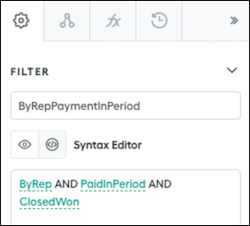
-
Add a field to the datasheet and create a marginal percent calculation,
mpercent(), that returns the commission rate to apply.=mpercent(ARR, MarginalPayoutRateTable, PriorAccumulationFromCloseDate) -
Create a prior accumulation calculation that uses the
let()function.=let(ThisCloseDate, CloseDate, let(ThisDealId, Id, sumif(ClosedByRepInPast2Years, date_between?(CloseDate, beginning_of_fiscal_year(ThisCloseDate), ThisCloseDate) AND if(CloseDate = ThisCloseDate, ThisDealId > Id, true), ARR)))This calculation references these values.
- The
ClosedByRepInPast2Yearsfilter goes back only two years because we don't expect payments to be received more than a year after the CloseDate. You can adjust the timeframe, but start with the smallest filter timeframe possible. - The
CloseDatesection narrows the results down to only the CloseDates that occur from the beginning of the year to the row that’s being calculated. - The
iffunction section finds any rows with the same close date as the row being calculated and orders them by DealId. - The
letfunction structure means you don’t have to subtract the current row's ARR because it's already being excluded from the accumulation.
 Tip Turn off trace in the settings of this calculation.
 - The
-
Finish the rule calculation. The basic commission calculation is the ARR multiplied by the rate, which can change depending on what month or year the rate applies to.
=ARR * RateAtCloseDate -
Optionally, if your tier table is based on attainment percentages, divide the previous AccumulationFromCloseDate by the quota from the correct year.
=sum(quotas(rep, "Quota", beginning_of_fiscal_year(CloseDate), end_of_fiscal_year(CloseDate)), amount)
Did this article solve your issue?
Let us know so we can improve!
