
You are here:
Create a Meeting Count Payout Rule
Help reps earn commissions for a specific number of meetings.
Required Editions
| Available in: both Salesforce Classic (not available in all orgs) and Lightning Experience |
| Available in: Enterprise, Unlimited, and Developer Editions |
| Available for an additional cost in: Professional Edition with Web Services API Enabled |
| User Permissions Needed | |
|---|---|
| To create a meeting count rule: | A Spiff user role with these permissions turned on.
|
In this example, the rep receives monthly compensation, so you identify meetings by rep and period.
-
In Designer, create a data filter and sub-data filters.
-
Create a data filter named MeetingsBySDRInPeriod, based on the Meeting
object.
This filter references two sub-data filters that you create next.
MeetingsBySDR AND SDRMeetingsInPeriod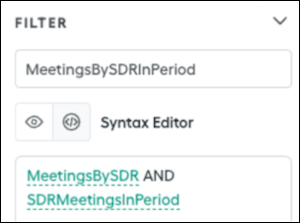
-
Create one of the sub-data filters, MeetingsBySDR, that matches each rep's ID to a field that indicates ownership of the meeting. Name the field SDR_Id.
SDR_Id = rep.Id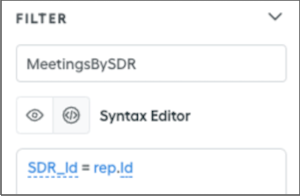
-
Create the other sub-data filter, SDRMeetingsinPeriod, hat confirms the meeting occurred within the payout period. Enter the
date_between?function, which places the Meeting_Date field within the specified statement period.date_between?(Meeting_Date, statement_period.start_date, end_of_period(statement_period.end_date))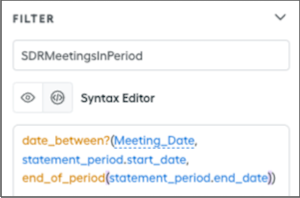
-
Create a data filter named MeetingsBySDRInPeriod, based on the Meeting
object.
-
Create quota tables.
-
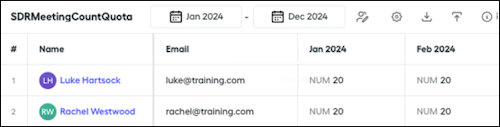
Create a quota table, SDRMeetingCountQuota, with quota values, such as 20 meetings per month, that use the number format for the meeting counter.
-
Create another quota table, SDRMonthlyTargetVariable, that specifies the target variable compensation values, which represents the amount that reps are paid if they meet their quota.
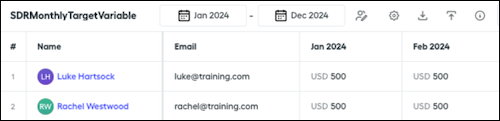
-
Create a quota table, SDRMeetingCountQuota, with quota values, such as 20 meetings per month, that use the number format for the meeting counter.
-
Create the SDRMeetingCountAttainmentInPeriod calculation.
-
Create a datasheet, MeetingsBySDRInPeriod_SimpleMeetingCountRuleExample, and include Meeting_Date.
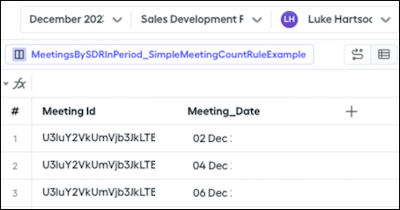
-
To determine the meeting count, apply the
countfunction to the MeetingsBySDRInPeriod data filter. - To determine attainment, divide the meeting count by the quota.
-
Create a datasheet, MeetingsBySDRInPeriod_SimpleMeetingCountRuleExample, and include Meeting_Date.
-
Create a worksheet, SimpleMeetingCountRuleExample_Worksheet, and add worksheet calculations.
-
Create a worksheet calculation, SDRMeetingCountInPeriod, that determines the total count of meetings by the SDR within the period.
=count(MeetingBySDRInPeriod_SimpleMeetingCountRuleExample!Meeting_Date)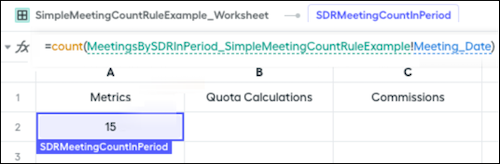
-
Create a worksheet calculation, SDRMeetingCountQuota, that references the SDRMeetingCountQuota quota table.
=quota("SDRMeetingCountQuota")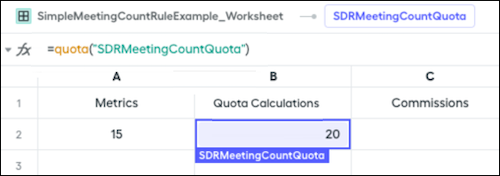
-
Create a worksheet calculation, SDRMeetingCountTargetVariable, that references the SDRMonthlyTargetVariable quota table.
=quota("SDRMonthlyTargetVariable")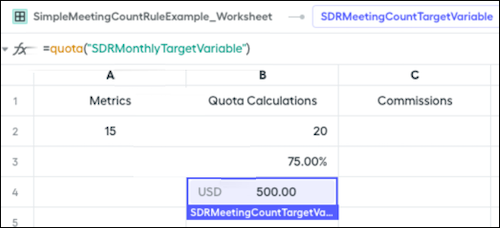
-
Create the final payout rule calculation, Payout_SimpleMeetingCountRuleExample, that multiplies the attainment by the target variable compensation.
In this example, the attainment calculation represents 75% of the target variable.
=SDRMeetingCountTargetVariable * SDRMeetingCountAttainmentInPeriod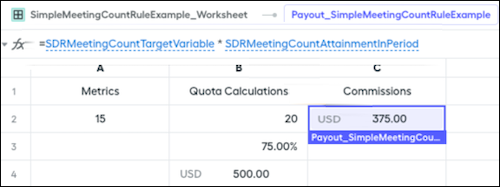
-
Create a worksheet calculation, SDRMeetingCountInPeriod, that determines the total count of meetings by the SDR within the period.
Did this article solve your issue?
Let us know so we can improve!
