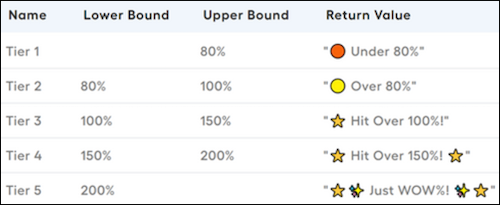
Enhance communication, simplify complex information, and create an engaging experience for your reps with emoji. Help reps be more productive by presenting information that’s informative and visually engaging on commission statements.
Required Editions
Available in: both Salesforce Classic (not available in all orgs) and Lightning
Experience
Available in: Enterprise, Unlimited, and Developer
Editions
Available for an additional cost in: Professional Edition with Web
Services API Enabled
Emoji can help transform numerical figures and statistics into easily digestible information
within seconds. Emoji are universal, transcending cultural and language barriers. Emoji
add a visual element to statements, capturing attention and conveying emotions,
achievements, and goals more effectively.
Emoji in Statement Formulas You can incorporate emoji into formulas to emphasize sales numbers. For example, adding emoji next to ACVs helps you quickly see their status and measure sales team performance.
Enhance Trending Performance with Emoji Visualizing the trending performance of commission statements over specific periods, such as months, quarters, or years, is crucial for data-driven decision-making. Incorporating emoji and creative visuals can enhance the presentation of performance stories, making them more engaging and insightful.
Add Emoji and Messages to Quota Performance Provide more information to reps about their performance against quota with emoji and messages. Motivate reps to reach their quotas by displaying the amount required to reach the quota, accompanied by a special congratulatory message upon achievement.
We use three kinds of cookies on our websites: required, functional, and advertising. You can choose whether functional and advertising cookies apply. Click on the different cookie categories to find out more about each category and to change the default settings.
Privacy Statement
Required Cookies
Always Active
Required cookies are necessary for basic website functionality. Some examples include: session cookies needed to transmit the website, authentication cookies, and security cookies.
Functional Cookies
Functional cookies enhance functions, performance, and services on the website. Some examples include: cookies used to analyze site traffic, cookies used for market research, and cookies used to display advertising that is not directed to a particular individual.
Advertising Cookies
Advertising cookies track activity across websites in order to understand a viewer’s interests, and direct them specific marketing. Some examples include: cookies used for remarketing, or interest-based advertising.