
You are here:
Add Emoji and Percentages to Attainment Bands
Help reps interpret their performance at a glance when you add emoji and percentages to attainment-based displays.
Required Editions
| Available in: both Salesforce Classic (not available in all orgs) and Lightning Experience |
| Available in: Enterprise, Unlimited, and Developer Editions |
| Available for an additional cost in: Professional Edition with Web Services API Enabled |
| User Permissions Needed | |
|---|---|
| To create a range table and rule for attainment: | A Spiff user role with these permissions turned on.
|
-
Create a range table named EmojiAttainmentTable, where each range corresponds to a specific emoji that you want to show for a specific attainment level in commission statements.
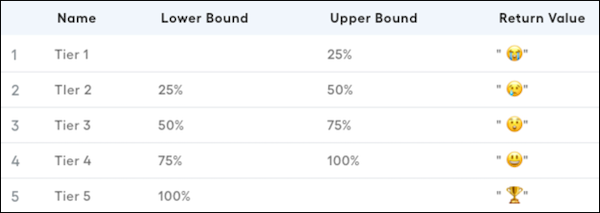
-
In the payout rule where you want to include the emoji based on attainment, include the
range_lookupfunction, attainment calculation, and range table.In this example, the attainment calculation is MonthlyAttainment and the range table is EmojiAtainmentTable. The calculation dynamically inserts the appropriate emoji based on the attained value.
range_lookup(MonthlyAttainment, EmojiAttainmentTable)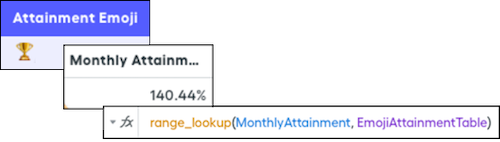
-
Create a calculation that uses the
concatfunction so the attainment and the emoji are on a metric card. Multiply the attainment calculation by 100 to get the correct percentage representation. Round the result to two decimal places. Add the % sign and append the attainment emoji calculation at the end of the string.concat([round(MonthlyAttainment * 100, 2), "%", AttainmentEmoji])
Did this article solve your issue?
Let us know so we can improve!
