You are here:
Create a Leaderboard Rule with Emoji
Encourage reps to meet company goals by adding emoji to the visual display of team performance rankings.
Required Editions
| Available in: both Salesforce Classic (not available in all orgs) and Lightning Experience |
| Available in: Enterprise, Unlimited, and Developer Editions |
| Available for an additional cost in: Professional Edition with Web Services API Enabled |
| User Permissions Needed | |
|---|---|
| To create a rollup filter and edit statements: | A Spiff user role with this permission turned on. Designer Configuration: Manage |
To create a leaderboard rule, establish a guided rollup that uses the User object and returns all of the specific users that you want on the leaderboard. Depending on the requirements, select different options to determine the participants. Create calculated fields in a specific order so your data applies to each user in the data set.
-
Using the rollup that you created, create a calculation that returns the number of total participants in the leaderboard.
count(AE_Leaderboard)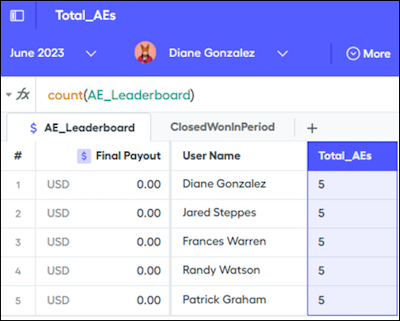
-
Create a calculation that returns the quota for each user in the data filter, not just the user selected in the context menu.
To handle null values, use the default value in the right panel instead of the
OR 0addition.quota("QuotaAE", statement_period.end_date, user) OR 0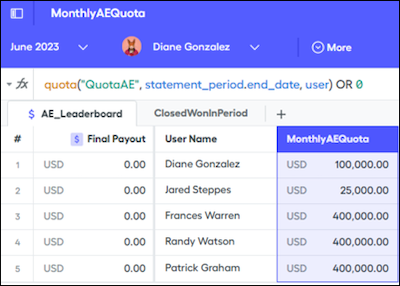
-
Create a calculation that returns the amount of revenue closed for the user in the period.
Make sure your data filter doesn’t filter by rep. The
sumifpart of the function performs the conditional rep filtering. If your data filter is filtered by rep, results are shown only for the rep selected in the context menu.sumif(ClosedWonInPeriod, OwnerId = user.Id, AR__c)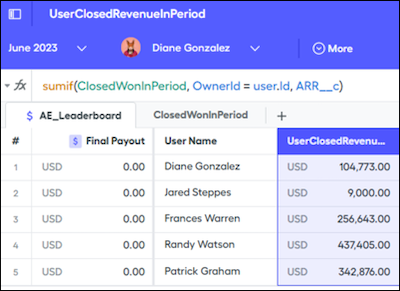
-
Create a calculation that returns the monthly attainment.
To prevent errors when dividing by zero, divide revenue in the period by quota with a null check.
if(MonthlyAEQuota > 0, UserClosedRevenueInPeriod / MonthlyAEQuota, 0)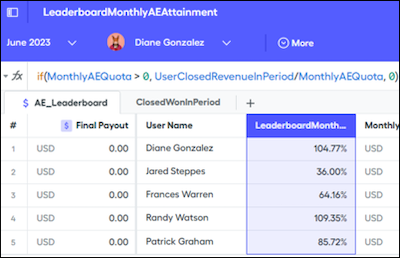
-
Create a calculation that ranks the users based on their attainment.
The
rankfunction returns the opposite of what you expect. If there are five reps, the highest rep returns a5. Subtracting the rank from the total and adding1reverses the order and puts the highest attainment at1.Total_AEs - rank(user, AE_Leaderboard, LeaderboardMonthlyAEAttainment) + 1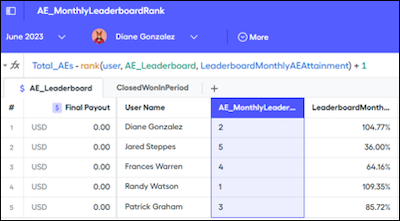
The top-level formula takes the leaderboard rank and multiplies it by zero because you aren’t summing the ranks, but you want to see the ranks on the leaderboard.
AE_MonthlyLeaderboardRank * 0 + LeaderboardFields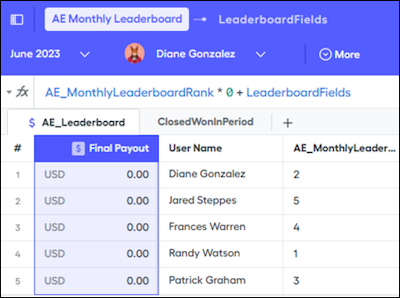
-
Add the leaderboard fields for visibility on the statement.
AE_Quota A summary calculation that can be a statement metric for each specific user and shows their quota. AE_Rank A version of the AE_MonthlyLeaderboardRank formula. FullName A duplicate of the normalized Name field on manually imported data. Normalized fields aren’t available on statements, so duplicating them allows the extra field to be used. if(AE_Quota,0,0) + if(AE_Rank,0,0) + if(FullName,0,0)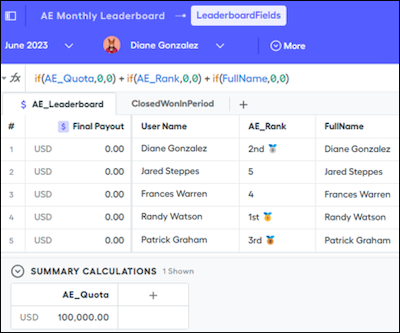
-
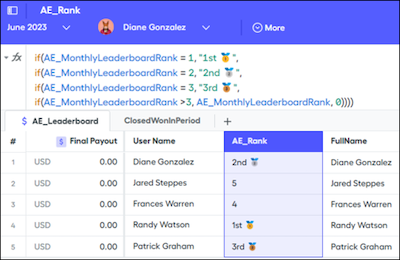
Add emoji to the leaderboard with the nested
iffunction and set your rankings with the emoji you want.if(AE_MonthlyLeaderboardRank = 1, "1st 🥇", if(AE_MonthlyLeaderboardRank = 2, "2nd 🥈", if(AE_MonthlyLeaderboardRank = 3, "3rd 🥉", if(AE_MonthlyLeaderboardRank > 3, AE_MonthlyLeaderRank, 0))))