You are here:
Exclude Specific Deals from a Statement
In some cases, you want to exclude specific deals from a rep's statement. You can use plan assignments to designate the excluded opportunities.
Required Editions
| Available in: both Salesforce Classic (not available in all orgs) and Lightning Experience |
| Available in: Enterprise, Unlimited, and Developer Editions |
| Available for an additional cost in: Professional Edition with Web Services API Enabled |
| User Permissions Needed | |
|---|---|
| To create a plan assignment and edit worksheet calculations: | A Spiff user role with these permissions turned on.
|
For example, maybe your company has a rule where a rep is paid for any team deal that closes if the rep is a part of that team, but a rep who joins the team after the deal closed isn't paid. This filter formula determines eligibility.
InvoicePaidInPeriod AND ClosedPriorToFY25 AND IsEligibleEmployeeIn this example, IsEligibleEmployee is defined as plan_assignment.effective_as_of ≤ CloseDate, where plan_assignment.effective_as_of is the rep's Effective As of Date on the plan.
If deals close in the month a new employee onboards, the new employee isn't eligible to be paid on the large team deal, but is eligible for all other deals.
-
Create a plan assignment.
- From the Admin menu, select Settings and then select Plan Assignments.
- Click Add Custom Field.
- Name the field ExcludedOpportunities.
- Add a description of the field.
- For the Field Type, select String.
- Save your changes.
-
Enter the plan assignment values.
- In the Plans tab, select the plan.
- Click Edit.
-
In the row for the rep, go to the ExcludedOpportunities column and enter values.
In this example, you want the filter to exclude the specified deal IDs from the rep's deals.
-
Create a worksheet calculation that returns the Plan Assignment field.
-
In Designer, open a worksheet and add a field for the plan assignment.
=plan_assignment.ExcludedOpportunities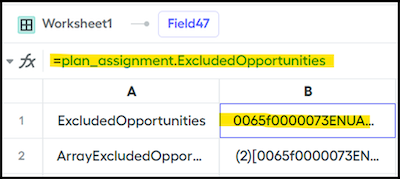
-
Add a field that references the plan assignment calculation.
=text_to_list(ifnull(ExcludedOpportunities,"0"),",")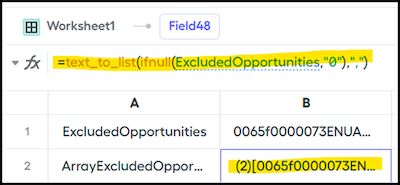
This function handles null values and converts the result to an array.
-
In Designer, open a worksheet and add a field for the plan assignment.
-
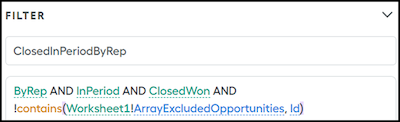
Adjust the Data Filter to exclude the values in the worksheet calculation.
AND !contains(Worksheet1!ArrayExcludedOpportunities,Id)