
You are here:
Freezing and Unfreezing Statements
Freezing statements locks the commission statements and prevents future recalculations from affecting the shown amount or fields. You can freeze individual statements, bulk-freeze multiple statements, and set up automatic statement freezing.
Required Editions
| Available in: both Salesforce Classic (not available in all orgs) and Lightning Experience |
| Available in: Enterprise, Unlimited, and Developer Editions |
| Available for an additional cost in: Professional Edition with Web Services API Enabled |
Think of freezing as closing the books for the period. The commission amounts remain the same even after making changes to calculations in Designer or connected Data Sources.
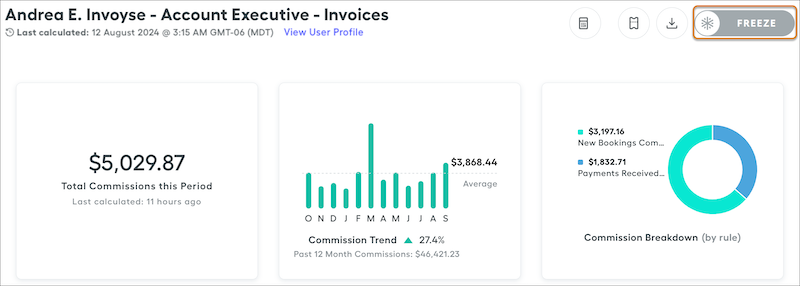
To freeze individual statements, navigate to a statement and click Freeze.
Bulk Freezing
Clicking Freeze on the Commissions page for a period freezes all users' statements for that statement period. Filter commission statements by team, plan, or both. After you filter, you can freeze the data for a specific team or plan.
If some statements in the period are frozen but other statements aren’t frozen, the bulk freeze button is gray and still allows bulk freezing all remaining unfrozen statements on the page.
Automatic Freezing
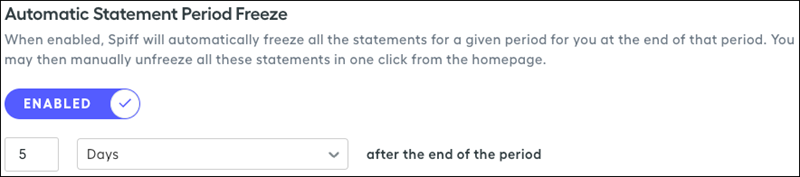
Automatically freezing statements at the end of a period can ensure that only current period statements are recalculated during any resyncs. Automatic freezing is an important setting that we recommend implementing. You can set up the automatic statement freeze in Admin Settings under Statement Period Management. Frozen statements can be manually unfrozen on the Commissions page if changes must be made.
Turn on the toggle and set up the number of days after the end of the period automatic freeze starts.
Considerations for Freezing Statements
- Deleting plan assignments deletes all historical statements for that rep and plan.
- Changes to the design of your statements apply to frozen statements.
- A renamed plan is reflected on frozen statements.
- When effective dates for a plan change, frozen statements persist even if effective dates for a plan change exclude the statement period. Unfrozen statements are deleted if they fall outside the new effective dates.
- If new plan assignments are added after you freeze the statements in a period, unfrozen statements are generated for reps with new plan assignments. The bulk freeze button again turns gray and allows you to freeze all statements in the period. Clicking the button simply freezes all statements currently generated in the period or filtered on the page.
- If you use Approvals and unfreeze the frozen statements in a given period, all Approvals are lost and can’t be recovered. In addition, any record of who was or wasn't approved can't be recovered.
- You can choose the time cadence for automatic statement freezing, but the maximum duration allowed is 12 months. Statements automatically freeze after the set period unless a shorter timeframe is set. Each night, around 3:00 AM Mountain Time (GMT-7), all non-frozen statements with a statement_period_end_date before the date set here are frozen. For example, suppose the period ends on January 31 and you set automatic freezing for zero days after the period. Any unfrozen statements for that period are automatically frozen on February 1 at 3:00 AM Mountain Time (GMT-7). To make changes, you can manually unfreeze statements to edit prior period. Any manually unfrozen statements past the date set in your company settings are re-frozen each night to improve performance and prevent data drift.
