
You are here:
Rep View of a Statement in Salesforce Spiff
Statements are specific to plans, and every rep on the plan sees the same information layout in their statements. If a rep has multiple plan assignments, they select a plan before they can view the statement for that plan.
Required Editions
| Available in: both Salesforce Classic (not available in all orgs) and Lightning Experience |
| Available in: Enterprise, Unlimited, and Developer Editions |
| Available for an additional cost in: Professional Edition with Web Services API Enabled |
An individual rep can access only their own statements, but admins can access statements for all reps.
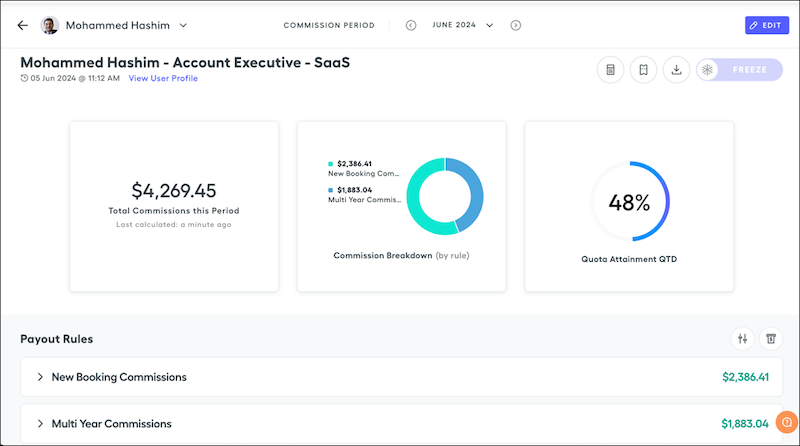
Each plan has multiple calculations and fields used to generate commissions. Admins can add or remove calculations from statements.
| Item | Description |
|---|---|
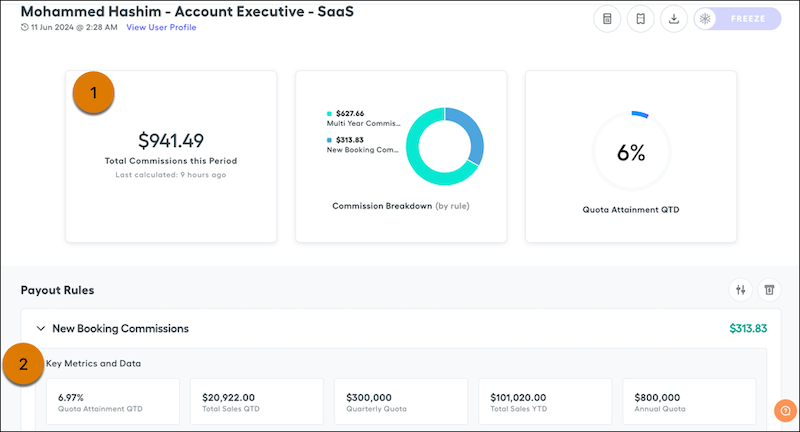
| Statement metrics (1) | Show data from all payout rules on the selected plan, rep, and period. By default, statements show metrics for commission breakdown, commission trend, and total commissions this period. Admins can remove metrics, add custom or prebuilt metrics, and rearrange their order. |
| Rule metrics (2) | Show data from a specific payout rule. Up to five metric cards appear in a payout rule. Admins can customize the order of the rules and data and can create cards with custom messages. |
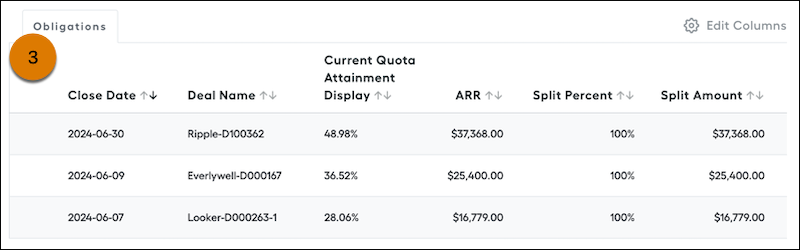
| Obligations (3) | Show commission amounts for specific deals. Multiple deals can contribute to the total commission for a rule. Obligations are commissionable events that apply to a rule. Each deal has its own row. To view record details and the logic that generated the commission amount, click a row. The Obligations table can show up to 250 rows. If the payout rule has more than 250 records, click Export statement in the footer to download the full data set. Viewing the commission logic for individual deal commissions is available only for rules that calculate commission line-by-line. |
Admins and reps can comment on any record shown on a payout rule and tag other users. You can also turn on ticket management so that individual users can submit requests for support on statements and obligations.

