
You are here:
Determining a Rep's Team Membership Status When a Deal Closes
Calculate rollups, territories, and split percentages for reps correctly in Salesforce Spiff. Determine whether a rep is part of a team on the date when a deal closes. You can use data filters or worksheet calculations.
Required Editions
| Available in: both Salesforce Classic (not available in all orgs) and Lightning Experience |
| Available in: Enterprise, Unlimited, and Developer Editions |
| Available for an additional cost in: Professional Edition with Web Services API Enabled |
Data Filters
Team membership status is often an issue with rollups or territories. For example, a rep is part of the East team and is credited for East deals closed during their tenure with the team. Or, a manager receives credit for deals closed by team members. However, it's crucial that they were on the team on the specific close date, not just within the same period.
With a guided rollup, you can automate the comparison of team effective dates with a selected date field.
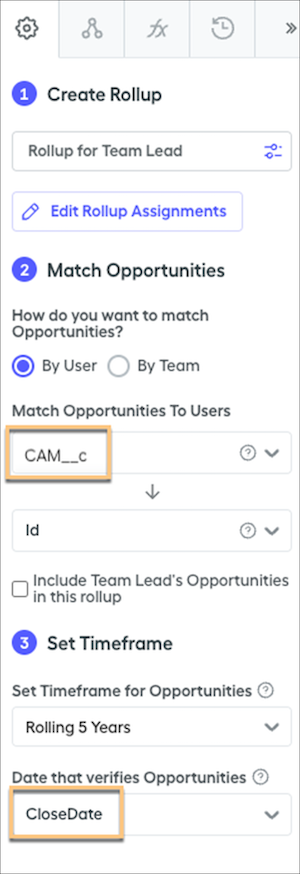
In this scenario, the guided rollup returns deals where the CAM__c field matches a rep and that rep was effectively part of the team on the deal's CloseDate. The selected timeframe, Rolling 5 Years, means that the filter matches deals from the previous five years. This timeframe doesn't mean that the rep has to be on the team only at some point during those five years.
Alternatively, you can use a double-filter.
| Item | Formula |
|---|---|
| Filter | contains(ListOfDealClosedByTeamMembers, Id) |
| Summary Calculation | ListOfDealClosedByTeamMembers = transform_list(filter(DealsInSpecifiedPeriod, ClosedByActiveTeamMember), Id) |
| Calculated Field | ClosedByActiveTeamMember |
Calculations
Guided rollups are useful for returning the correct deals, but commission logic often requires a similar check within the payout logic. For example, when a manager receives credit for deals, they typically obtain related rollup credit. If a rep contributes to closing a deal and receives a 30% split, the manager also receives 30% credit. If many reps help close the deal, such as one rep with a 30% split and another rep with a 30% split, the manager gets the total amount, which is 60%.
The members() function returns a list of reps for a given team or teams and date ranges. In this case, return the reps for a specific date by setting the start date and end date as the same date. There are multiple ways to retrieve team objects, and the members() function will also accept various input values, such as team names (strings).
For example, maybe you want to check an opportunity owner. All fields are built on the Opportunity object, and the dates specified are the CloseDate. The first calculation, ClosedByActiveTeamMember, returns true or false and other calculations can reference it, like the double filter.
ClosedByActiveTeamMember = contains(TeamMembers_OnCloseDate, OwnerId)TeamMembers_OnCloseDate = members(ManagersTeams, CloseDate, CloseDate)ManagersTeams = direct_manager_of(CloseDate, CloseDate)In another example, maybe you want to check split owners for a sum of their splits. This example uses the same team calculation, because the specific date is linked to the opportunity. In certain scenarios, the team member list and subsequent uses of that list can pertain to the Opportunity Split level. In such cases, apply the same logic and replace CloseDate with Relationship.CloseDate.
SplitPercentageRollup = sumif(OppToOppSplits, contains(TeamMembers_OnCloseDate, SplitOwnerId), Split_Percentage)TeamMembers_OnCloseDate = members(ManagersTeams, CloseDate, CloseDate)ManagersTeams = direct_manager_of(CloseDate, CloseDate)